Quick answer: Yes, some platforms now combine a link shortener, a link-in-bio page and website analytics in one account, and for most small teams that is better than paying for three tools. The real gain is not the smaller bill. It is that a click on a short link and the visit it produced on your site live in the same system, so you can follow post to click to visit to goal without stitching exports together. Three separate tools still make sense for high-traffic sites, deep ad-platform reporting, or teams where different people own each tool.
Key takeaways
- A shortener counts clicks, a bio tool counts taps, and a website analytics tool counts visits. With three vendors, those numbers have no shared identifier, so they never reconcile.
- Joining them gives you one funnel (link click, site visit, goal), one set of definitions, one privacy review and one bill.
- Separate stacks typically cost somewhere between $20 and $90 per month at small-team scale on list prices. A combined tool usually lands between $12 and $30.
- Consolidation has real trade-offs: shared usage limits, less depth than a dedicated analytics suite, and fewer commerce features than creator-store bio tools.
- Judge the switch by one question: can you now answer "which link produced this result on my site?" without opening a spreadsheet.
The three-tool stack most people end up with
Nobody plans this stack. You needed short links for a campaign, so you signed up for a URL shortener. Instagram and TikTok allow one profile link, so you added a link-in-bio tool. Someone asked about website traffic, so you installed Google Analytics or a privacy-first alternative like Plausible. Each choice was reasonable on the day. Now you have:
- A shortener that knows how many times each short link was clicked, from where, on which device.
- A bio tool that knows how many times each button on your bio page was tapped.
- A website analytics tool that knows how many people visited each page, and roughly where they came from.
Each one answers its own question well. None of them can answer the question you actually care about, which is what the click did after it landed.
The gap: three numbers that never match
Here is a typical week, with made-up numbers to show the shape of the problem. You post a product launch on Instagram and put the link in your bio.
| Tool | What it reports | Example number |
|---|---|---|
| Bio tool | Taps on the "Shop the launch" button | 620 |
| Shortener | Clicks on the short link behind that button (also shared in a newsletter) | 1,040 |
| Website analytics | Sessions on the launch page with Instagram as the source | 410 |
Which number is right? All three, measured differently. And none of them can be joined to the others, for a few reasons:
Different definitions. One tool counts every tap, another deduplicates by visitor, a third counts sessions that start after a consent choice. Bot filtering differs from vendor to vendor.
Lost referrers. In-app browsers on Instagram, TikTok and most chat apps often send no referrer, so the visit shows up as Direct in your analytics rather than as Instagram. The bio tool knows the tap came from Instagram, but it cannot pass that fact to the analytics tool.
Consent and blockers. If your website analytics uses cookies, visitors who reject the banner or run an ad blocker never appear at all. Server-side click counting in the shortener still records them, so the gap between clicks and visits grows for reasons that have nothing to do with your landing page.
No shared key. This is the root cause. The shortener's click record and the analytics tool's visit record have nothing in common: no ID, no token, no link between them. You can add UTM parameters by hand to narrow it down, but you are still comparing totals across systems, not following a click into a visit.
The result is a monthly ritual of exporting three CSVs and explaining why they disagree. We covered the attribution theory behind this in how to track which short link actually drove a sale. This article is about the tooling decision that makes that attribution possible in the first place.
What joining the three tools makes possible
When the shortener, the bio page and the website analytics share one account, the gap above closes in specific, practical ways.
One funnel from post to goal
The shortener can hand the click to the website. In useClick, when someone clicks one of your short links, the redirect adds a short attribution token to the landing URL. The website analytics script reads it, removes it from the address bar, and records that the visit arrived through that click. If the visitor later completes a goal, the completion can be traced back to the link.
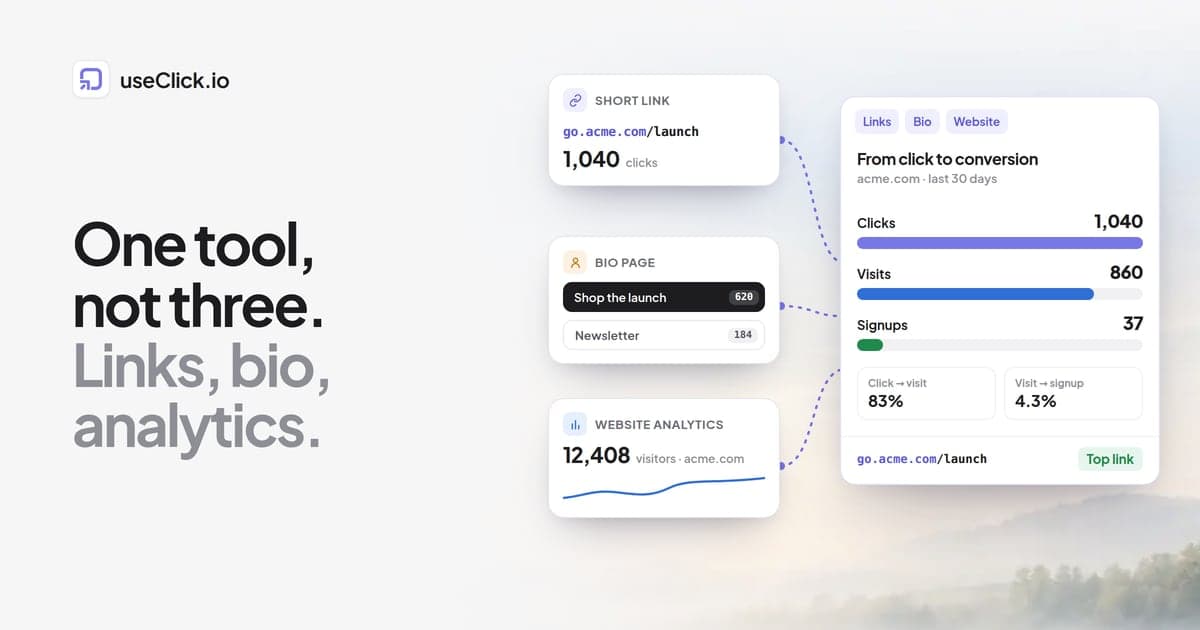
On Growth and above, a "From click to conversion" report in the website analytics reports shows this as a funnel for each site: clicks on short links that point to the site, visits that arrived through those clicks, goal completions, attributed revenue, and your top converting links. That gives you a sentence a three-tool stack cannot produce, for example: "this short link got 1,040 clicks, 860 became visits, and 37 of those visits signed up."
Be clear about what this is. It is aggregate attribution by link, based on a token passed through the redirect. It is not a profile of individual people, and it only covers visits that came through your own short links. A visitor who later returns by typing your URL will not be connected to their earlier click.
Bio buttons become part of the same funnel
On a link-in-bio page that belongs to the same platform, every button is a tracked short link. That means a tap on "Shop the launch" is a short link click like any other, and if the button points at your own website it flows into the same click-to-visit-to-goal report.
One honest detail: in useClick, the bio page shows each button's click count, but there is no separate count of views of the bio page itself, and a button's number includes clicks on that short link from anywhere you shared it. If you want bio-only numbers, give the bio button its own short link. The mechanics of reading bio button data are covered in how a link in bio with analytics shows you what is working.
One campaign vocabulary
UTM tags you add to short links show up in the website analytics Campaigns view, grouped by campaign, source and medium. When both sides live in one tool, the naming convention is defined once. You stop discovering that the shortener says instagram while analytics says ig and the bio tool says nothing at all.
One privacy model
Three tools means three privacy policies, three data processing agreements to review, and possibly three sets of cookies. A combined platform means one review. useClick's website analytics script sets no cookies and stores no IP addresses: unique visitors are counted with a one-way hash that changes daily. Link clicks are counted server-side during the redirect, with the same no-IP approach. That is the design that lets most sites run analytics without a consent banner, though whether you need one still depends on the laws that apply to you and anything else running on your site.
One bill
One subscription, one invoice, one login to offboard when someone leaves.
What it actually costs: three tools versus one
The table below uses typical list prices for entry-to-mid tiers, billed monthly, as published by vendors in each category in September 2026. Prices change often and annual billing is usually cheaper, so check current pricing before you decide.
| Category | Typical monthly list price | What you usually get at that price |
|---|---|---|
| URL shortener with custom domain and analytics | roughly $10 to $35 | Branded short links, click analytics, limited history on lower tiers |
| Link-in-bio tool, paid tier | roughly $5 to $35 | Custom design, no vendor branding, button click counts |
| Privacy-first website analytics | roughly $9 to $20 at small traffic volumes | Visits, pages, sources, often goals |
| Google Analytics | free | Deep reporting, but cookies and a consent banner in the EU |
| Separate stack, total | roughly $20 to $90 | Three logins, three sets of numbers |
For comparison, useClick's plans cover all three in one account:
| Plan | Price | Short links | Clicks + page views per month | Bio pages | Websites | Goals, funnels, click to conversion |
|---|---|---|---|---|---|---|
| Free | $0 | 10 | 1,000 | 1 (with badge) | 1, 14-day trial | No |
| Starter | $12/mo | 300 | 25,000 | 2 | 2 | No |
| Growth | $29/mo | 1,000 | 50,000 | 5 | 5 | Yes |
| Pro | $49/mo | 5,000 | 150,000 | 10 | 10 | Yes |
| Business | $199/mo | 25,000 | 1,000,000 | 20 | 20 | Yes |
Two things in that table deserve attention before you do the maths.
First, clicks and page views share one monthly budget. On Starter, 25,000 means link clicks plus website page views combined, not 25,000 of each. If your site already gets 40,000 page views a month, Starter is too small no matter how few links you create.
Second, the funnel that joins everything starts at Growth. Starter gives you short links, bio pages and website analytics in one place, which already removes two logins and gives you UTM campaigns across both. The click-to-visit-to-goal report, goals, funnels and user journeys are Growth features.
When three separate tools are still the right call
Consolidation is not always better. Here are the cases where we would keep the stack.
Your site has a lot of traffic
Because page views count toward the same monthly budget as clicks, a content site with hundreds of thousands of monthly page views will either need a high tier or will hit its limit. A dedicated analytics tool priced by page views may be cheaper for that part of the job. You can still use a combined tool for links and bio, and keep the separate analytics.
You rely on Google's advertising ecosystem
If you import conversions into Google Ads, build remarketing audiences, or export raw events to BigQuery, Google Analytics does things a lightweight analytics tool is not designed to do. useClick's website analytics also has no CSV export (link click data does, on paid plans, plus an API). If raw event exports feed your reporting, check that before switching. Our comparison of privacy-first Google Analytics alternatives goes through who should and should not leave GA.
Your bio page is really a storefront
Some link-in-bio tools are built around selling: digital products, tips, bookings, payment processing. If most of your revenue happens inside the bio page, a combined link-and-analytics platform will not replace that. See the Linktree alternatives comparison for tools built around creator commerce.
Different teams own different tools
If the social team owns the bio page, the growth team owns links and the web team owns analytics, consolidation is an organisational change first. Budget time to agree on one UTM convention and one set of reports.
How to consolidate without breaking anything
- Keep the old short links alive. Links already published in bios, videos and print keep pointing at the old shortener. Do not delete them. Create new links on the new platform from now on.
- Move the bio page first. It is one URL in each social profile, the easiest thing to switch and the one that most benefits from being inside the same funnel.
- Install the new website analytics script alongside the old one for one reporting cycle, so you can see how the numbers differ before you rely on them.
- Write down one UTM convention and apply it to every new link.
- Set up one or two goals (a signup, a purchase) so the click-to-conversion report has something to measure. This is the step most people skip and the reason they never see the benefit.
Frequently asked questions
Is there a link shortener with built-in website analytics?
Yes. Some link platforms now include a website analytics script alongside short links, so the same account reports both link clicks and visits to your own site. useClick is one: short links, link-in-bio pages and cookie-free website analytics share one dashboard, and on Growth and above a report connects short link clicks to the visits and goal completions they produced.
Can I replace Bitly and Linktree with one tool?
For most people, yes. A platform that includes branded short links, a bio page whose buttons are tracked short links, and click analytics covers what the majority of Bitly and Linktree users actually use. If you depend on a specialist feature, such as selling products inside your bio page, check that the replacement supports it before switching.
Can a link in bio page track website visits?
A bio page on its own only knows that a button was tapped. It can track what happens on your website only if the same platform also runs your website analytics and passes the click through to the visit. That is the main reason to pick a link in bio with website analytics in one tool rather than two separate products.
Is an all-in-one link platform cheaper than separate tools?
Usually, at small-team scale. Separate tools typically add up to somewhere between $20 and $90 per month on list prices, while combined platforms often start around $12 to $30. The exception is a high-traffic website, because combined platforms often count page views against the same monthly budget as clicks.
Do I still need Google Analytics if my link tool has website analytics?
Not for traffic, sources, pages and goals. You may still want it if you import conversions into Google Ads, build ad audiences, or export raw event data. Many teams keep Google Analytics for ad reporting and use the combined tool for day-to-day link and campaign questions.
Does tracking link clicks and website visits together require cookies?
No. Link clicks can be counted server-side during the redirect, and website analytics can count visitors with a daily anonymous hash instead of a cookie. useClick passes the click to the visit with a short token in the landing URL, held in the tab's session storage, not a cookie.
Why don't my link clicks match my website visits?
Some clicks never become visits: people close the tab, bots follow links, and slow pages lose visitors before the analytics script loads. Separate tools also define visits and bots differently. A combined tool reduces the definitional gap but will never show a 1 to 1 match, and it should not.
The decision in one paragraph
If you are paying for a shortener, a bio tool and website analytics separately, and you use the basics of each, consolidate. You will spend less, but the bigger change is that "which link produced this signup?" becomes a report instead of a spreadsheet project. Keep a separate tool only for the job where you genuinely need its depth: heavy site traffic, Google's ad ecosystem, or commerce inside the bio page. If you want to see how the combined reports look, explore useClick's website analytics or start on the free plan with a short link and a bio page.