
A/B Testing for Links

Split your audience across different destinations and optimize for conversions. Test landing pages, offers, and content variations to find what works.

This video demonstrates the UseClick.io dashboard interface, showing link analytics, click tracking, and campaign management features. The demo highlights the privacy-first approach to link analytics.

A/B testing, also called split testing, sends different portions of your audience to different destination URLs so you can optimize marketing campaigns based on real performance data.

UseClick's A/B testing feature makes it easy to set up experiments, track results, and identify winning variations that drive more conversions.

Whether you're testing landing pages, offers, or content variations, this guide helps you make data-driven decisions for your link marketing strategy.

A/B Testing Interface

Create and manage your A/B tests through UseClick's testing dashboard:

A/B testing interface showing multiple link variations

Set up experiments with up to 4 different destination URLs per test.

Setting Up Your First A/B Test

Creating an A/B test with UseClick means tagging separate short links as variants. Follow these steps to get started:

Create Your First Variation

Create a short link for the first version you want to test, then open the "A/B Testing" dropdown and tag it Variant A.

Add More Variations

Create up to three more short links for the other versions you're comparing, tagging each one Variant B, C, or D.

Note Where You're Sharing Each Link

Use the optional "Where will you place this link?" field on each variant to record its channel or placement, such as email, social, or a specific ad, so you can tell the results apart later.

Compare Your Results

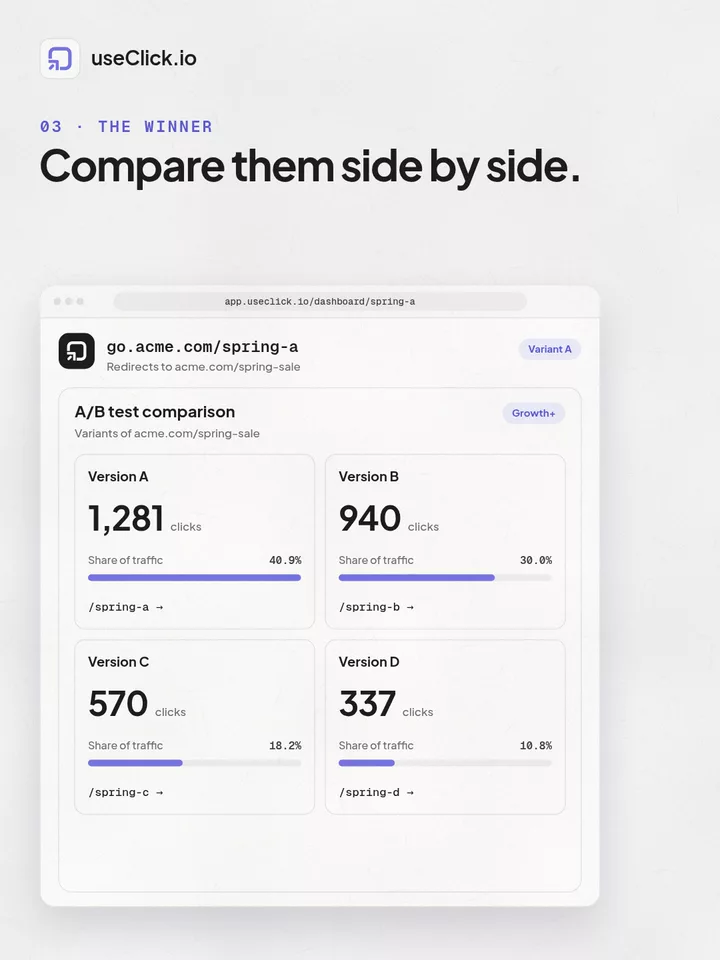
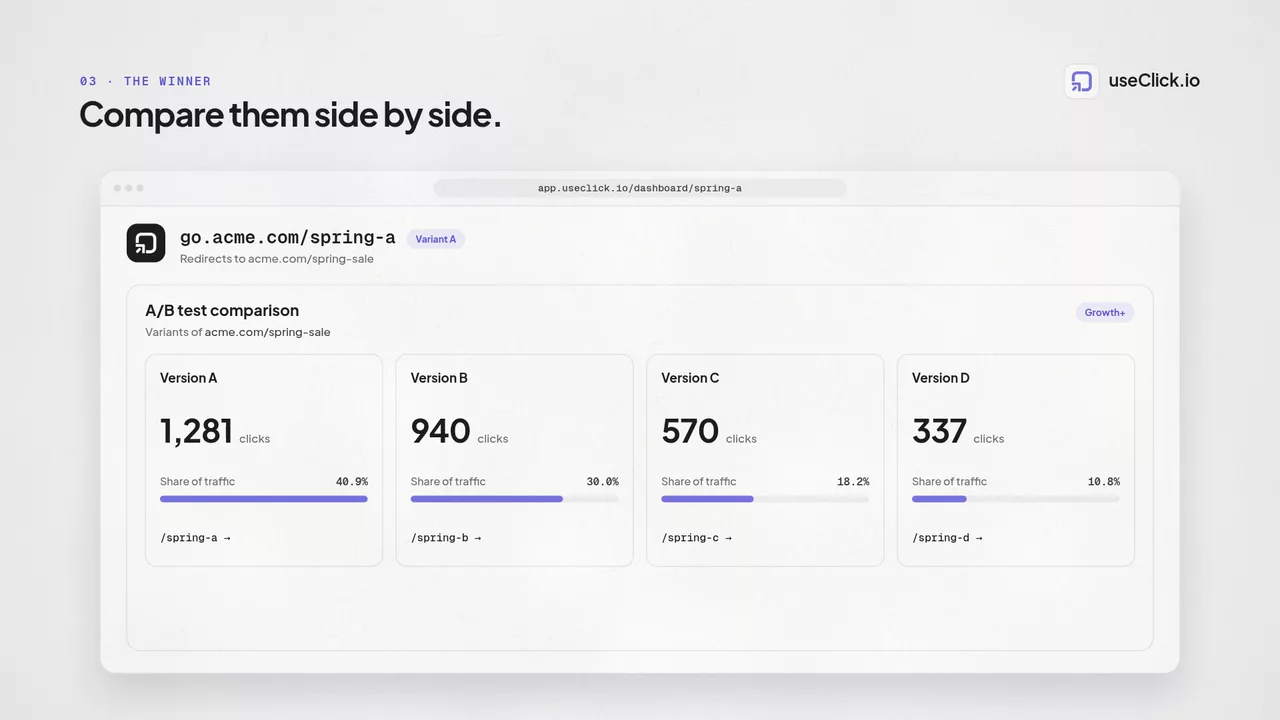
Once your variant links start collecting clicks, open any one of them from your links dashboard. UseClick pulls in the other tagged variants and shows a side-by-side breakdown of clicks and traffic share, highlighting the current leader.

Short links list showing variant labels next to click counts and traffic sources

A couple of things worth knowing about how variant tagging works:

Up to 4 Variants (A/B/C/D)

Tag as many as four short links per test using the A, B, C, or D labels.

You Control the Traffic

UseClick doesn't route or split incoming visitors automatically. How many people see each variant depends on where and how widely you share its link.

3. Test Duration and Sample Size

For reliable results, your A/B tests need sufficient traffic and time:

Minimum Sample Size

Ensure statistical significance with adequate traffic:

  • At least 100 visitors per variation for basic insights
  • 1000+ visitors per variation for reliable conversion data
  • Higher traffic needs for smaller expected differences

Test Duration

Run tests long enough to account for behavioral patterns:

  • Minimum 1 week to capture daily variations
  • 2-4 weeks for seasonal or weekly patterns
  • Avoid ending tests during unusual traffic periods

Tracking Performance and Results

UseClick shows exactly how your variant links are performing against each other, right from your dashboard.

What UseClick Tracks for Each Variant

Click Volume

Total clicks each variant link has received

The variant with the most clicks is automatically highlighted as the current leader in your comparison view.

Traffic Share

Each variant's clicks as a percentage of the test's combined total

A quick way to see how far ahead, or how close, your leading variant is.

Full Analytics Per Variant

Every variant link keeps its own complete analytics dashboard

Open any variant's link page individually for its country, device, browser, and referrer breakdown.

Combine With Geo-Targeting

Route visitors to different destinations by country within the same link

Geo-targeting works alongside variant tags, letting you localize a single variation instead of testing traffic sources for it.

For country-based redirects, learn how to use our Geo Link Targeting feature to deliver location-specific content.

Reading Your Test Results

UseClick doesn't run confidence-interval math for you, but the comparison view gives you what you need to judge results yourself.

How the Comparison View Works

Each variant card shows its click count and share of total traffic, with the current leader highlighted:

🔢
Total clicks each variant link has received so far
%
Each variant's percentage of the test's combined clicks
🏆
The variant with the most clicks gets a green border and a winner badge

When You Need More Data

If your variants have collected fewer than about 30 total clicks combined, UseClick flags that there isn't enough data yet. Treat an early lead with caution until more clicks come in.

Common A/B Testing Scenarios

Here are proven A/B testing strategies that work well with UseClick's platform:

Email Marketing Optimization

Test different landing pages for the same email campaign:

Scenario: Newsletter with product announcement
Variation A: Direct to product page
Variation B: Landing page with additional context and social proof
Measure: Conversion rate and time on site

Social Media Campaign Testing

Optimize social media traffic with targeted landing pages:

Scenario: Instagram promotion for new service
Variation A: Mobile-optimized landing page
Variation B: Instagram-specific page with visual storytelling
Measure: Mobile conversion rates and engagement

Content Marketing Tests

Test different content formats and approaches:

Scenario: Link in blog post to resource download
Variation A: Direct PDF download
Variation B: Gated content with email signup
Measure: Download completion vs. lead generation

A/B Testing Best Practices

Test One Variable at a Time

Keep tests focused to identify what drives performance changes:

  • Change headlines OR images, not both simultaneously
  • Test page layout OR content, not multiple elements
  • Run sequential tests for complex optimizations

Document Your Hypotheses

Keep clear records of what you're testing and why:

  • Write down expected outcomes before starting
  • Note the reasoning behind each variation
  • Track learnings for future test planning

Organize your A/B tests within campaigns to keep related tests grouped together for easier management and analysis.

Consider External Factors

Account for variables that might affect your results:

  • Seasonal trends and holidays
  • Marketing campaign timing
  • Website changes or updates
  • Industry events or news
  • For large-scale A/B tests with many variations, consider using our bulk upload feature to efficiently create and manage test links

Track the performance of your A/B tests with our analytics dashboard to compare variant performance and identify winning variations.

Testing Workflow Blocks

Run repeatable A/B testing cycles with clear structure for better conversion decisions.

Define Variants

Set up destination variants for offers, headlines, or landing page angles.

Tag Your Links

Create a short link for each version and tag it A, B, C, or D for a clean side-by-side comparison.

Measure Results

Compare click volume, traffic share, and campaign-level performance.

Roll Out Winner

Promote the best variant and continue iterative testing for ongoing gains.

Frequently Asked Questions

UseClick.io lets one short link distribute traffic across up to four variants (A/B/C/D), so you can compare destination performance without changing the public URL.

No. With redirect-level traffic splitting, A/B testing can be done in an SEO-safe way because the test logic runs at the short-link layer, not by altering indexed page structure.

UseClick.io supports up to four variants per link, enabling richer multivariate link-level testing than basic two-variant setups.