
Referrer Source Tracking
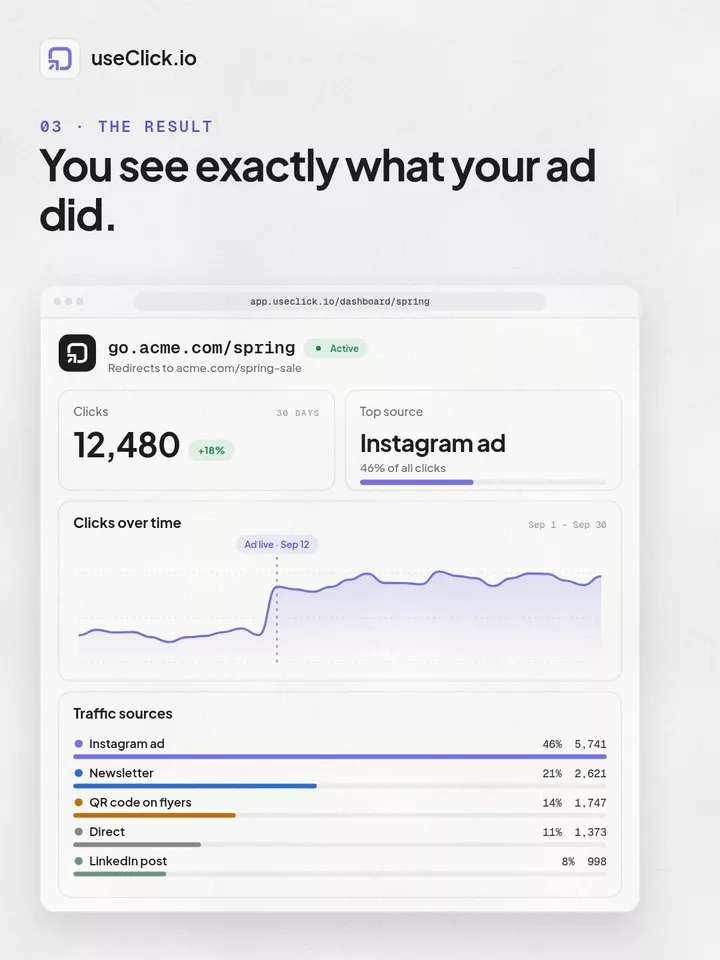
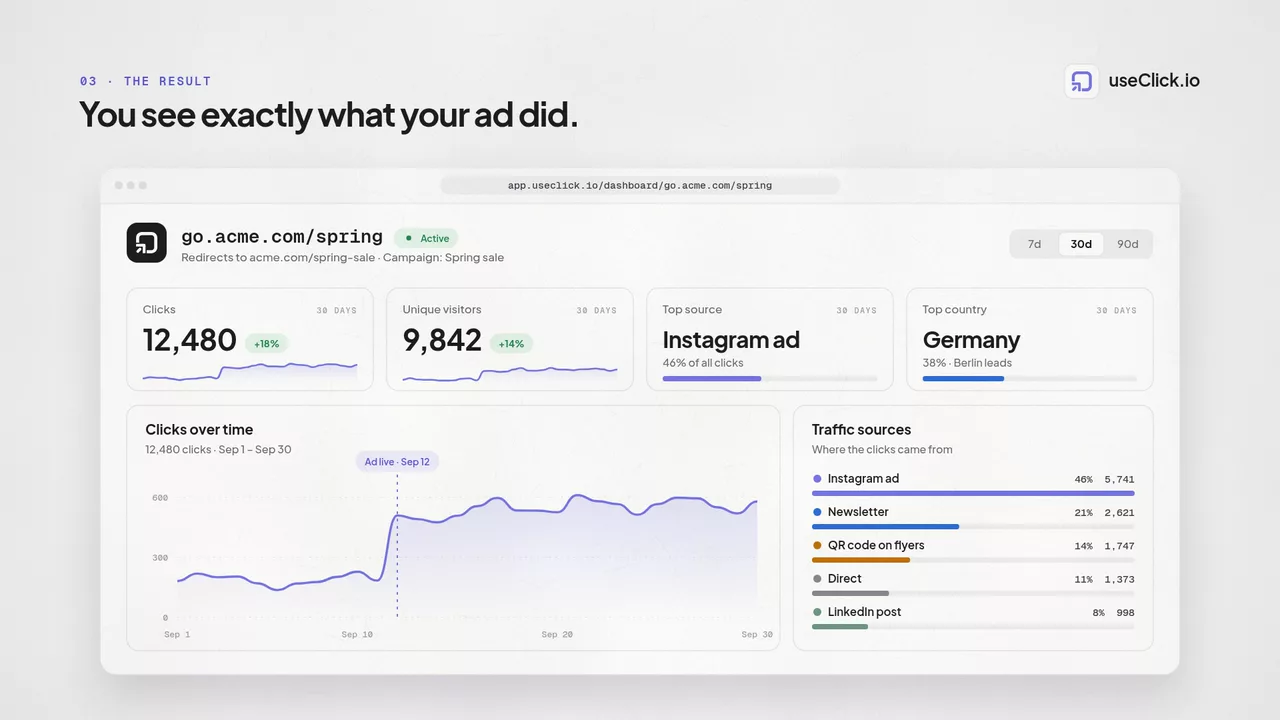
See which sites, apps, and social platforms are sending you clicks. Referrer data is tracked per link and can be filtered alongside your other dimensions to spot which channels are actually driving traffic.
Learn how to use useClick Analytics to better understand your audience and make data-driven marketing decisions with privacy-first tracking.
useClick Analytics provides comprehensive insights into your link performance with privacy-first tracking that respects user privacy while delivering the metrics you need to optimize your marketing campaigns.
With detailed click tracking, geographic insights, and device analytics, you can make informed decisions about your content strategy and audience targeting without compromising on privacy compliance.
In this guide, we'll walk you through how to use useClick Analytics to get the most out of your click events and engagement data.
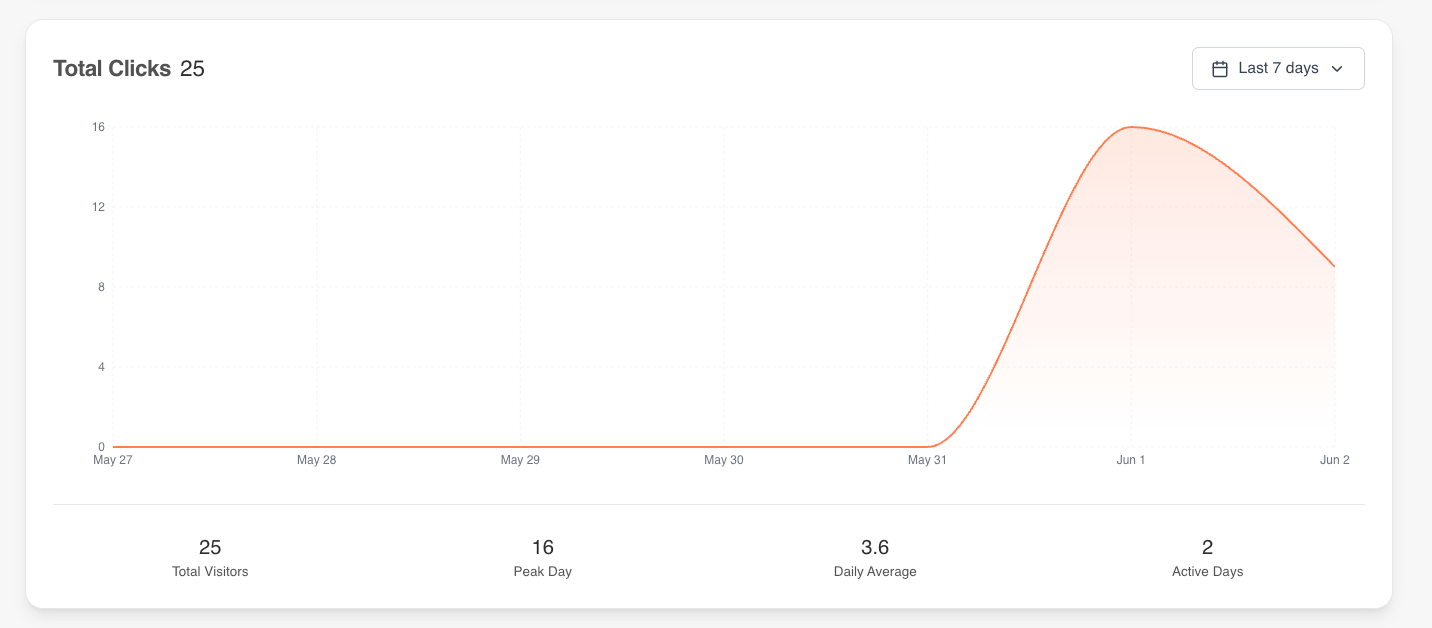
Here's what useClick's Analytics dashboard looks like:

useClick's Analytics dashboard consists of several key views that help you understand your audience:

See which sites, apps, and social platforms are sending you clicks. Referrer data is tracked per link and can be filtered alongside your other dimensions to spot which channels are actually driving traffic.
Every link's analytics page includes a recent-clicks list with your latest activity - up to 200 events, each with its country, device, browser, and referrer. Open the full list in a modal any time you check the dashboard; it refreshes when you load or revisit the page rather than streaming updates live.
Beyond the core views above, useClick Analytics includes a few capabilities most link shorteners leave out:
Automated and bot traffic is detected and broken out separately from human clicks, with the bot's name and category, so your visitor counts reflect real people.
Explore where your clicks are coming from on an interactive 3D globe alongside the standard country, region, and city breakdowns.
Turn on public stats for any link to share a read-only stats page with a copyable link and an embeddable 3D-globe snippet - no login required for whoever you share it with.
Unlike traditional analytics tools, useClick prioritizes user privacy while still delivering actionable insights:
Track engagement without invasive tracking
Built-in compliance with European privacy regulations
Focus on behavior, not individual tracking
Collect only what's necessary for insights
useClick Analytics comes with powerful filtering capabilities that allow you to drill down into specific segments of your data.
CSV export is available on Starter, Growth, Pro, and Business plans (not on Free), with each export capped at 50,000 rows. Once your plan supports it, you can export your filtered analytics data to CSV whenever you need it. This is useful for:

Understanding these metrics will help you make better marketing decisions:
The total number of times your links have been clicked. This includes all sources: direct clicks, QR code scans, and embedded links.
Shows where your audience is located, helping you optimize content timing and localization strategies.
Understanding whether your audience primarily uses mobile, desktop, or tablet devices helps optimize your destination pages.
These are the analytics details teams use most when optimizing short links and campaigns:
Separate unique reach from repeat engagement to understand audience quality and true campaign performance.
Review click distribution by country, region, and city to improve localization and geo campaigns.
See exactly which platforms your visitors use so landing pages and creatives match user context.
Identify your best-performing hours, weekdays, and months to schedule launches at the right time.
Switch reporting timezone and compare custom periods for more accurate operational decision-making.
Data retention scales with your plan: 30 days on Free, 12 months on Starter, 24 months on Growth, and 3 years on Pro and Business. Paid plans can export the retained data to CSV, up to 50,000 rows per export, for stakeholder reporting and deeper analysis.
Check your analytics weekly to identify trends and optimization opportunities. Look for patterns in when your audience is most active.
Use UTM parameters consistently to track campaign performance and understand which marketing channels drive the best results.
Take advantage of our privacy-first approach to maintain user trust while still gathering actionable insights for your marketing strategy.
useClick tracks clicks server-side without placing cookies on user devices or collecting personal data. This gives you actionable analytics while supporting GDPR, CCPA, and PECR compliance goals.
useClick shows total clicks, time-series trends, geographic data, device and browser breakdowns, operating system insights, and referral sources, plus a recent-clicks log of your latest activity, with filters and CSV export on paid plans.
useClick tracks referral sources and campaign attribution, so you can compare channel performance across social, email, paid ads, and direct traffic from one dashboard.
Yes. useClick is a privacy-first analytics platform focused on cookie-free link tracking and data minimization, designed for teams that need clear marketing insights with strong compliance posture.
A shortener, a bio tool and an analytics script each see one piece of the story. useClick runs all three in one account. When a short link brings someone to your site, the signup or sale they complete there is credited to that link.
Create branded short links and track every click.
Short Link Management →One page for all your links, with per-link analytics built in.
Link in Bio →Cookie-free traffic, regions, and top pages, no consent banner.
Website Analytics →useClick makes link management effortless. Create branded short links that are clean, memorable, and built to strengthen your brand identity.
