
Short Link Management
Create branded short links and track every click.
Short Link Management →See exactly who's sending you real visitors, broken down by referrer, channel, and campaign, and catch the AI crawlers, search bots, and answer engines hiding in your numbers before they skew your reporting.
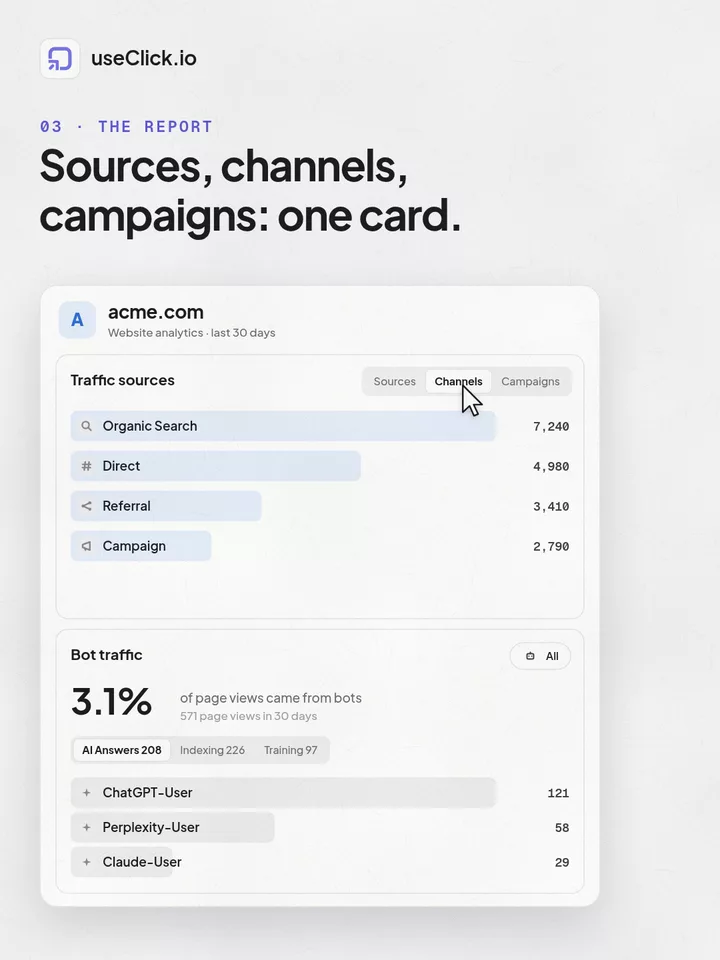
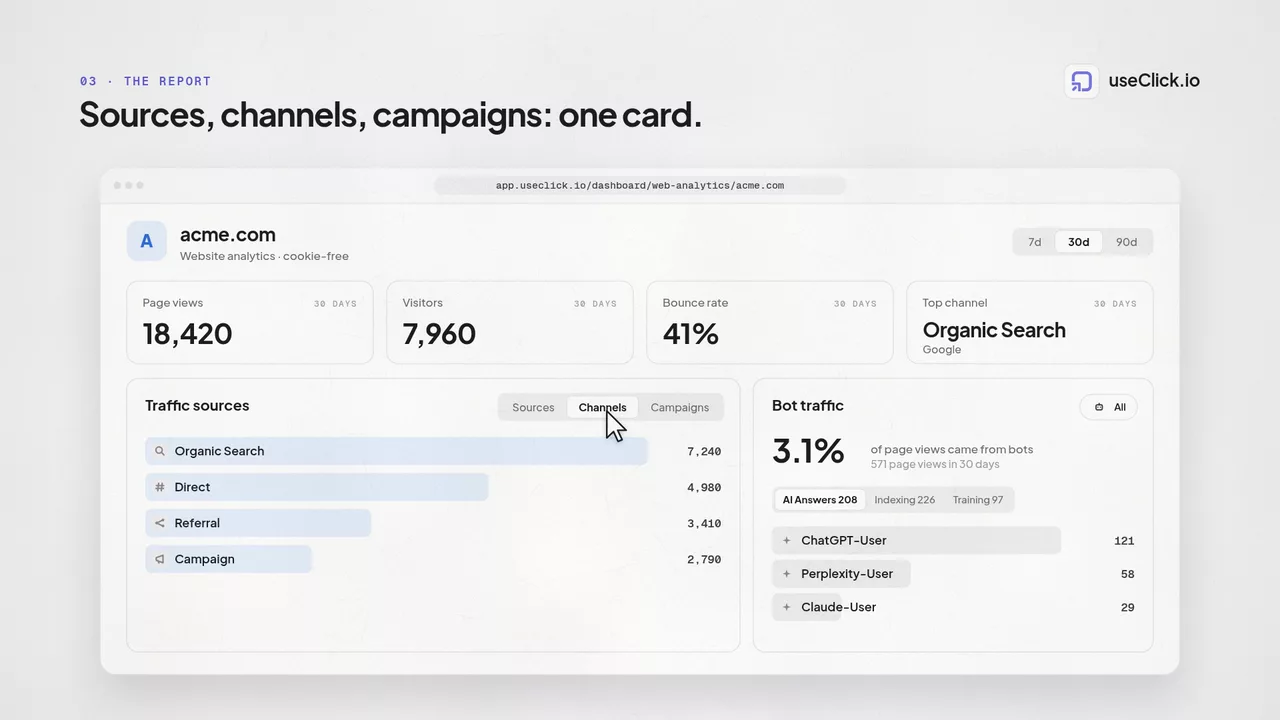
Every click on a UseClick short link, and every page view on a site running Website Analytics, carries a referrer and, where present, UTM parameters. Website Analytics organizes that signal into a three-tab card, Sources, Channels, and Campaigns; an individual short link's Analytics page shows a focused Sources list instead, since channel and campaign grouping is a site-wide view. Both contexts also get a separate card dedicated entirely to non-human traffic.
Most analytics tools stop at a flat referrer list and a single generic "bot" toggle. UseClick keeps the referrer detail, brand icons for the platforms people actually send you traffic from, adds channel logic that correctly folds your own domain's referrers into Direct instead of miscounting them as external traffic, and breaks bot traffic down into categories most dashboards never separate: AI answer engines, search crawlers, AI training crawlers, and everything else.
The result is a source breakdown you can trust for budget decisions, and a bot traffic detection view that tells you not just how much non-human traffic you're getting, but what kind, whether you're looking at one link or a whole site.
The Sources tab lists every referring domain that sent a visitor to your link or site, ranked by traffic. Rather than raw hostnames, each row gets a recognizable icon.
Traffic from the social networks, search engines, and platforms people actually use is shown with its brand icon instead of a bare domain string, so you can scan the list at a glance instead of parsing hostnames.
Referrers outside that core set aren't dropped or lumped into "Other." Each one displays its own site favicon, so long-tail referral sources, partner blogs, forums, smaller publishers, stay individually identifiable.
Channels take the same raw referrer and UTM data as Sources and group it into four buckets, so you can answer "where is our traffic coming from" at a glance instead of reading through a list of domains.
No referrer present: links typed directly, opened from bookmarks, or clicked from apps and messengers that strip referrer headers.
Traffic arriving from a recognized search engine's results page.
Traffic arriving from another site's link, article, or page, anything that isn't search, campaign, or direct.
Traffic that carries UTM parameters, regardless of which domain it came from.
A visitor who clicks from one page on your own site to another still carries a referrer header, your own domain. Left unhandled, that gets counted as external Referral traffic and inflates your numbers with visits that never left your site. UseClick checks the referrer's domain against the site's own domain and folds those hits into Direct instead, so Referral only ever reflects traffic that genuinely came from somewhere else.
Channels is the second tab in that same Website Analytics card, one level up from Sources. It's a site-wide view, so it doesn't appear on an individual short link's Analytics page; a single link's traffic shows up in Sources there instead.
The Campaigns tab groups hits by the UTM parameters attached to the link: campaign, source, medium, term, and content. Instead of one combined campaign name, each dimension is broken out separately, so you can tell whether a drop in performance came from the campaign itself, the source sending traffic, or the specific creative behind utm_content.
utm_campaign, utm_source, utm_medium, utm_term, and utm_content are each tracked and reportable on their own, so a single campaign can be sliced by which source or which piece of creative actually drove the traffic.
Campaigns pairs with UTM Builder to generate consistent parameters up front, and with campaign management to group the resulting links and see performance roll up per campaign.
Campaigns is the third tab alongside Sources and Channels, also specific to Website Analytics. An individual short link doesn't get its own Campaigns tab; to see how one campaign performs across the links inside it, group those links into a campaign instead.
A separate card is dedicated entirely to non-human traffic. Instead of one generic bot bucket, hits are categorized into four groups, each with its own total and its share of overall traffic, plus a full-list modal that names every crawler counted inside it.
Each category shows its total hit count and what percentage of your overall traffic it represents, so you can judge at a glance whether AI crawler activity is a rounding error or a meaningful share of your numbers. Opening a category's full-list modal shows every individual crawler counted inside it, from named AI Answer Engine bots down to the long tail filed under Other Bot.
Crawlers behind AI-powered answer and chat products, fetching pages to generate responses to user questions.
Traditional search engine crawlers indexing pages for search results.
Crawlers that collect content to train AI models, tracked separately from the answer-engine and search categories.
Everything else identified as automated traffic that doesn't fit the three named categories above: monitoring tools, scrapers, and miscellaneous bots.
Click-to-filter isn't the same everywhere in UseClick, and knowing the difference saves you from clicking a row and wondering why nothing happened.
On a single short link's Analytics page, both the Sources list and the Bot & AI-Crawler Traffic card are click-to-filter. Click a referrer or a bot category and every other chart on that page, countries, devices, browsers, recalculates around just that traffic.
On Website Analytics, the Sources/Channels/Campaigns card and the Bot & AI-Crawler Traffic card are built for browsing a whole site's traffic: switch tabs, scan totals and percentages, open the full-list modal. Rows there don't filter the rest of the dashboard.
Referrer and bot reporting are two of the easiest places for analytics tools to cut corners, because a flat list is faster to build than a categorized one. UseClick treats both as first-class dashboard views.
Traffic that never left your own site is folded into Direct, not counted as external referral traffic, a distinction most tools skip entirely.
AI answer engines, search crawlers, AI training crawlers, and everything else are tracked separately, with their own totals and percentages, not merged into a single bot traffic line.
20+ platforms show their actual brand icon instead of a bare domain string, and every other referrer still gets its own favicon rather than being lumped into an undifferentiated "Other" bucket.
The same pipeline that records a click or page view builds the Sources, Channels, Campaigns, and Bot Traffic cards without any extra setup.
Each click or page view records its referrer header and any UTM parameters present, alongside device, browser, OS, and country, no cookies involved.
The referring domain is checked against the known-platform icon library, checked against your own domain for the self-referral fix, and checked against known bot and crawler signatures.
Everything identified as human traffic populates the relevant card: the three-tab Sources/Channels/Campaigns view on Website Analytics, or the Sources list on an individual link's Analytics page.
Everything identified as a bot or crawler is routed to its own card and categorized into AI Answer Engines, Search/Indexing, AI Training, or Other Bot.
Four steps take you from a link click to a source and bot breakdown you can act on.
Every click carries its referrer and any UTM parameters automatically, no extra tracking code to add.
The dashboard sorts hits into Sources, Channels, and Campaigns, or into a bot category, as they arrive.
On an individual link's page, click a referrer or bot category to filter every other chart down to that segment. On Website Analytics, switch tabs and open the full list to see everything at once.
Self-referrals don't skew Referral, and bot traffic doesn't skew your human numbers, the totals reflect real visitors.
Bot traffic detection identifies which hits on your links and pages come from automated crawlers rather than real people, so those hits don't skew your visitor counts, conversion rates, or channel reporting. UseClick breaks bot traffic into AI Answer Engines, Search/Indexing crawlers, AI Training crawlers, and an Other Bot catch-all, each with its own total and share of overall traffic, so you can see how much of your reported traffic is actually human.
Each hit's user agent is parsed and checked against known crawler and AI-crawler signatures to classify it, the same parsing UseClick uses to report browser, device, and OS. The raw user agent string itself is never stored, consistent with UseClick's no-cookie, no-IP data collection.
Sources lists individual referring domains, with brand icons for major platforms and a favicon fallback for everything else. Channels groups that same data into four buckets, Direct, Organic Search, Referral, and Campaign, so you get a summary view alongside the detailed one.
When a visitor clicks from one page on your site to another, their browser still sends a referrer header pointing at your own domain. UseClick checks the referrer's domain against your site's own domain and folds those hits into Direct, so Referral only reflects traffic that actually came from somewhere else.
AI Answer Engines are crawlers behind AI-powered answer and chat products, fetching pages to generate responses to user questions. AI Training crawlers collect content to train AI models. UseClick tracks them as separate categories, each with its own total, percentage of traffic, and a full list of the individual crawlers counted inside it.
Yes. The Campaigns tab groups hits by utm_campaign, utm_source, utm_medium, utm_term, and utm_content separately, so you can tell whether a change in performance came from the campaign itself, the source sending traffic, or a specific piece of creative.
It depends on where you are. On an individual short link's Analytics page, both the Sources list and the Bot & AI-Crawler Traffic card are click-to-filter, click a row and every other chart on that page recalculates to just that referrer or bot. On Website Analytics, the Sources/Channels/Campaigns card and the Bot & AI-Crawler Traffic card are built for browsing across a whole site's traffic, tabs to switch view, a full-list modal to see everything, rather than filtering the rest of the dashboard.
A shortener, a bio tool and an analytics script each see one piece of the story. useClick connects all three, so every visit comes with where it started and where it ended.
Create branded short links and track every click.
Short Link Management →One page for all your links, with per-link analytics built in.
Link in Bio →Cookie-free traffic, regions, and top pages, no consent banner.
Website Analytics →UseClick.io makes link management effortless. Create branded short links that are clean, memorable, and built to strengthen your brand identity.
