Quick answer: You need one tool that owns both halves of the journey: the short link click and the on-site pageview. When someone clicks your link, that tool tags the visit with a token; when they later sign up or buy, the same tool matches that token back to the exact click, link, and source. Most link shorteners and most analytics tools each own only one half, which is why "which link actually converted" is usually a guess.
Key Takeaways
- 78% of marketing leaders say their attribution data doesn't match their revenue reports (Omnibound, 2026).
- Only 14% of teams have fully automated lead-to-revenue tracking; most still stitch it together by hand.
- Click-to-conversion attribution needs three linked records: the click, the landing session, and the conversion event, tied together by one token.
Why "Which Link Converted?" Is Usually a Guess
Link shorteners are good at one thing: counting clicks. They'll tell you a link got 500 clicks from Instagram and 200 from an email. What they can't tell you is how many of those 700 people actually signed up or bought something, because that happens on your website, after the click, in a completely different tool.
Analytics tools have the mirror-image problem. They see a pageview and, if you're lucky, a UTM parameter. They don't know which specific link, out of the dozens you might have live at once, sent that visitor. Ask a typical marketing team "which link drove our last 10 sales" and you'll get a shrug, not an answer. That gap is exactly why 78% of marketing leaders say their attribution data doesn't line up with what finance sees in revenue reports (Omnibound, 2026), and why only 14% have this tracked automatically instead of pieced together after the fact.
The Three Records You Actually Need
Closing the gap doesn't require a big martech stack. It requires three things, linked by one shared token:
- The click: which link, which visitor, which source, captured the instant someone clicks.
- The landing session: confirmation that the visitor from that click actually arrived and loaded your site, not just that the link was clicked (clicks and visits are not the same number; bots, slow connections, and abandoned loads all create a gap between them).
- The conversion event: the signup, purchase, or other action, fired from your own code and matched back to that same session.
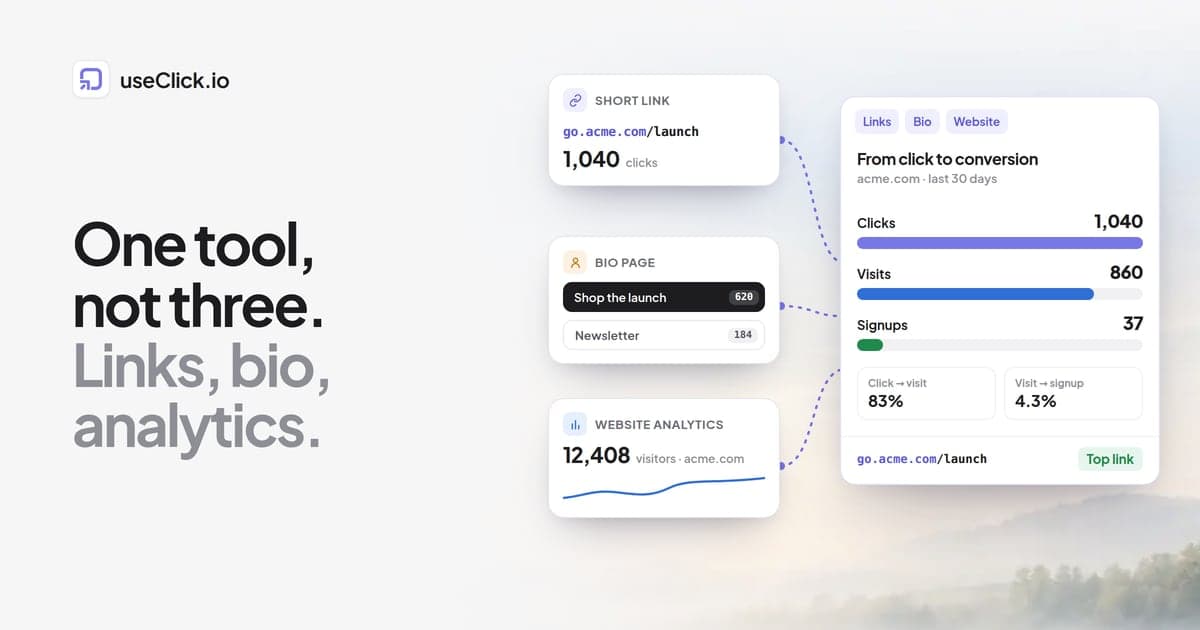
When the same token travels through all three steps, you get a real funnel: clicks → visits → conversions, plus which specific link and which specific goal, not just aggregate totals. UseClick's website analytics does exactly this: a short link click gets tagged, the tag travels through the redirect to your site, and any conversion you track afterward, useclick.track("signup") or useclick.track("purchase", {revenue: 49.99}), gets matched back to that original click automatically.
What This Actually Looks Like
In practice, the dashboard answers three questions you couldn't answer before:
- What's my real conversion rate? Not clicks, not visits, but clicks that became paying customers, end to end.
- Which specific link is worth scaling? If your top link by clicks converts at 1% and a smaller link converts at 8%, that's the one to put budget behind, and you'd never see that from click counts alone.
- What's the revenue, not just the count? Tagging a conversion with a revenue amount means the funnel shows dollars, not just a number of signups.
None of this requires switching analytics platforms or adding a tag manager. It requires the click tracker and the analytics tracker to be the same product, which is the part most tool stacks get wrong by design: they're built by different companies solving different halves of the problem.
Frequently Asked Questions
Do I need to change my links to use this?
No. The attribution token is added automatically to your existing short links; nothing changes about how you share or format them.
What if a visitor clears cookies or closes the tab before converting?
The token lives in sessionStorage, not a cookie, so it survives for that browsing session but doesn't persist across days or devices. That's a deliberate privacy tradeoff, the same reason UseClick doesn't need a consent banner in the first place.
Does this work for purchases with different amounts, not just signups?
Yes. Conversion goals support a plain event (signup), a pageview match (landing on /thank-you), or a revenue event with a dollar amount attached, so purchases of any size show up correctly in the funnel.
Can I see this per link, or only for my whole site?
Both. The dashboard shows your site's overall funnel plus a breakdown of your top-converting individual links, so you can see which one is actually worth scaling.
See It on Your Own Links
If you're already running short links and have no idea which ones are actually driving revenue, that's the exact gap this closes. Set up Website Analytics, add a conversion goal, and the next sale that comes through will show you exactly which link brought it.