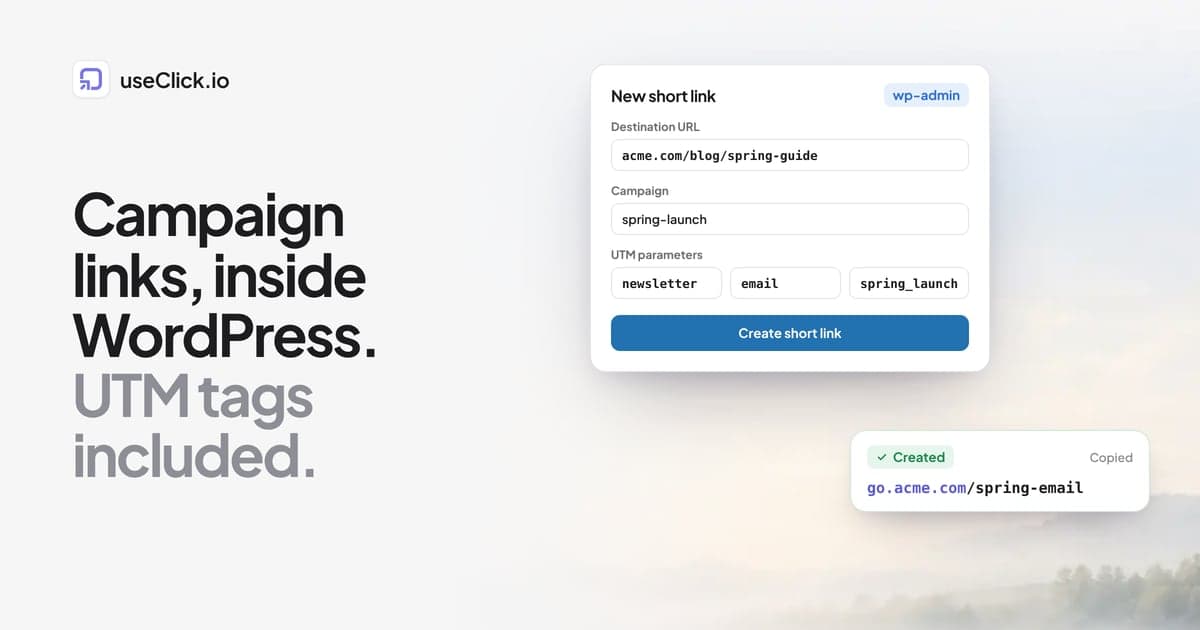
Quick answer: With the free useClick plugin you can build campaign links in WordPress itself. Open useClick > Create short link, paste the post or page URL, fill in the campaign and the UTM source, medium and campaign, and save. You get a short link with the tags already appended to the destination, grouped under its campaign, with click counts in wp-admin. Campaigns and UTM tags are on the Starter plan and above.
Key takeaways
- A campaign link is a normal URL with UTM tags, wrapped in a short link that counts clicks.
- Doing it inside WordPress removes the copy and paste between a spreadsheet, a UTM builder and a shortener, which is where most tagging mistakes happen.
- Decide your naming scheme once: lowercase, no spaces, one value per channel.
- Each post can also get its own short link from the editor sidebar for everyday sharing.
What a campaign link is
A campaign link has two parts.
The first is the destination with UTM tags:
https://acme.com/blog/spring-guide?utm_source=newsletter&utm_medium=email&utm_campaign=spring_launch
The tags tell any analytics tool where the visit came from. They are standard, so useClick, Google Analytics, Matomo and Shopify all read them the same way.
The second is a short link that wraps it: go.acme.com/spring-email. It is easier to paste into a social post or print on a flyer, it hides the long tag string, and it counts every click, including clicks from apps and email clients where no analytics script runs.
The usual workflow builds these in three places: a UTM builder in one tab, a shortener in another, and a spreadsheet to remember what was created. The plugin puts all three steps in one form.
Set up once
Connect the plugin
Install useClick from the WordPress plugin directory, open useClick > Settings and click Connect with useClick.io. After you sign in and confirm, the plugin reads your plan and marks fields your plan does not include, so you never fill in a field the API would reject. The WordPress plugin guide has screenshots of each step.
Pick a domain
Links can use the built-in short domain or your own, such as go.acme.com. Branded domains are available on every plan, and they make links in emails and SMS look trustworthy. How to set up a custom domain for short links explains the one DNS record you need.
Write down your naming scheme
This is the step that makes the reports readable a year from now. A simple scheme:
| Tag | Meaning | Allowed values (examples) |
|---|---|---|
| utm_source | Where the link lives | newsletter, linkedin, instagram, x, partner_name |
| utm_medium | The type of channel | email, social, paid_social, cpc, referral, print |
| utm_campaign | The campaign | spring_launch, webinar_q4, black_friday |
| utm_content | Which link in that place | header_button, footer_link, story_1 |
Rules that save the most pain: always lowercase, underscores instead of spaces, and one agreed value per channel. LinkedIn, linkedin and li show up as three sources. The free UTM builder uses the same field names if you want to test a scheme first.
Create a campaign link step by step
- In wp-admin, open useClick > Create short link.
- Paste the Destination URL, for example the post you want to promote.
- Pick the domain and type a slug that says what the link is:
spring-email,spring-linkedin. Leave it empty for a random one. - Type the Campaign, for example
spring-launch. This groups links in the Short links screen and in your useClick dashboard. - Open UTM parameters and fill in source, medium and campaign, plus content when you have several links in one place.
- Click Create short link. The result shows the short link with a copy button.
Repeat for each channel. For a launch with an email, two social networks and a partner newsletter you end up with four links in one campaign:
| Slug | utm_source | utm_medium | utm_content |
|---|---|---|---|
| spring-email | newsletter | header_button | |
| spring-linkedin | social | post | |
| spring-instagram | social | bio | |
| spring-partner | partner_name | referral | issue_42 |
Same destination, four links, four rows in the report.
Send some countries elsewhere (optional)
The form also has a Geo-targeting section: visitors from chosen countries go to a different URL, everyone else to the destination. It is useful for a regional landing page or a store in another currency. Geo-targeting is on Starter and above.
Everyday sharing: a short link for every post
Not every link needs campaign tags. For everyday sharing, the plugin adds a Short link box to the post editor sidebar. Click Create short link and the post gets its own short link, which you can copy whenever you share it.
The post and page lists also get a Short link column with the click count, so you can see which posts people actually share and click without opening another tool. Counts are cached for five minutes to keep wp-admin fast.
QR codes for print
Every short link has a QR code in your useClick dashboard. For a printed flyer or a poster, create a campaign link with utm_medium=print and use its QR code. Scans arrive as clicks with the device and country, so the poster shows up in the same campaign report as the email. How to make a trackable QR code covers sizes and placement.
Reading the campaign
In useClick > Short links, choose the campaign in the filter to see only its links, each with its click count. That answers "which channel got clicks".
For the next question, "which channel got results", look at the website side. With the tracker on (the plugin adds it when you switch on Website analytics), the site report shows visitors by source, including UTM sources, and the pages they read. On Growth and above, goals tie conversions such as signups or purchases back to the short link that brought the visitor, so the campaign report shows clicks, visits and conversions per link. Click to conversion attribution explains how that connection is made without cookies.
Mistakes worth avoiding
- Tagging internal links. UTM tags on links from one page of your site to another overwrite the original source of the visit. Use them only on links that live outside your site.
- Reusing one link everywhere. A single link for email and social tells you how many clicks the campaign got, not where they came from. One link per channel costs nothing.
- Changing the destination later without thinking. Editing a link's destination keeps its click history but sends new visitors somewhere else. That is useful for fixing a typo, misleading for a report. Editing a link's destination is on Starter and above.
- No campaign field. Without a campaign, a year of links becomes one long list. Group them from the start.
Frequently asked questions
Does WordPress have a built-in UTM builder?
No. WordPress has no UTM or campaign link feature. You need a plugin or an external builder. The useClick plugin adds a campaign link form with UTM fields to wp-admin.
Do I need the Starter plan for campaign links?
Campaigns and UTM parameters on links are part of Starter and above. On Free you can still create short links for any URL, with your own domain, and see their clicks.
Can I edit a campaign link after I created it?
Yes. The Short links screen has edit and delete. Changing the destination of a link is available on Starter and above; the click history stays with the link.
Will UTM tags break my pages?
No. UTM tags are query parameters that your pages ignore. If you use a caching plugin, make sure it serves cached pages for URLs with UTM tags; most do by default.
Can my team use the same campaigns?
Yes, if they use the same useClick account or a team workspace (Pro and Business). Links created in WordPress and in the useClick dashboard live in the same account, so a campaign started in one shows up in the other.
Can I create campaign links for pages that are not on my WordPress site?
Yes. The destination can be any URL: a landing page on another domain, a product in your store, an event page.
The decision in one paragraph
If you already write and publish in WordPress, build your campaign links there too. One form gives you the UTM tags, the short link and the campaign group, and the click counts sit next to the posts they promote. Agree on the naming scheme before the first launch, create one link per channel, and the report at the end of the campaign is a filter away instead of a weekend in a spreadsheet.