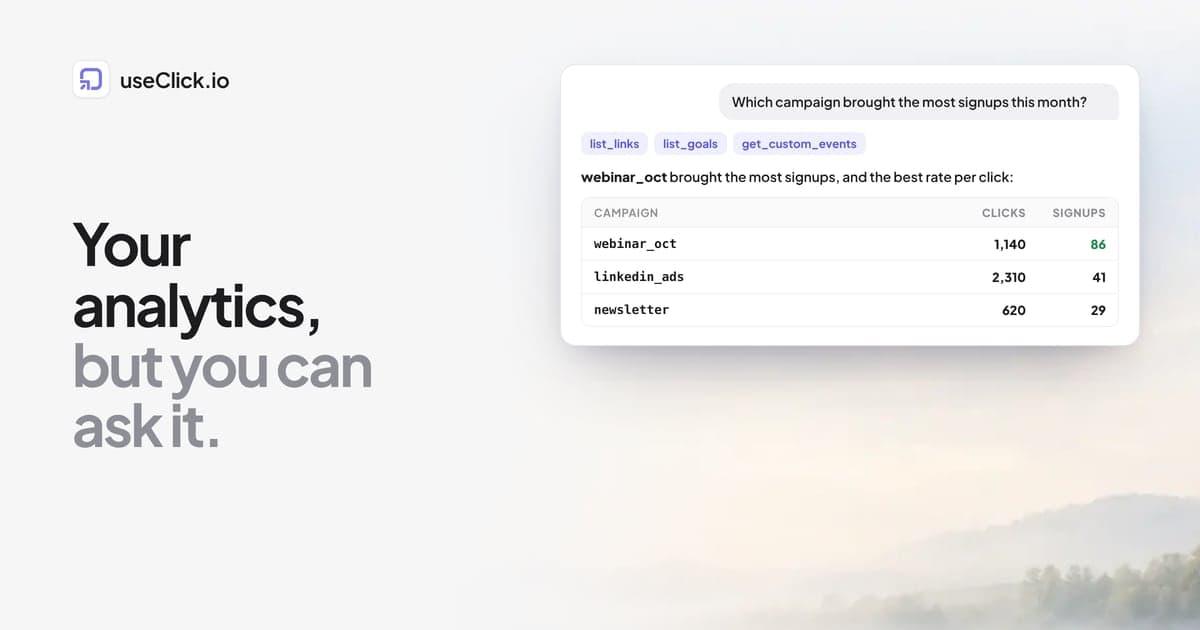
Quick answer: useClick runs a remote MCP server at https://useclick.io/api/mcp. Add it to Claude, Claude Code, Cursor, Codex or n8n with your API key, and the AI can read your short links, their clicks, your website traffic, custom events such as signup, and your conversion goals. Then ask: "Which campaign brought the most signups this month?" The AI looks up the campaign links, their clicks and the signups that came from short links, and answers with the numbers it used.
Key takeaways
- MCP lets an AI assistant call your analytics as tools instead of you exporting CSVs into a chat.
- The useClick server has eleven tools: create, list, read, update and delete links, plus link analytics, website analytics, custom events, goals and account info.
- Good answers need good data: campaign links with UTM tags, and a
signupevent or goal on your site.- Analytics questions have a daily quota per plan and a five-minute cache, so ask once and follow up in the same chat.
Why ask instead of opening a dashboard
A dashboard is good at the questions its designer expected. Most real questions are a combination: "which campaign brought signups, and was it the same channel as last month?" or "which links did people click but not convert on?". Answering those means opening three reports, filtering each, and doing arithmetic in your head.
An AI assistant connected over MCP can make those calls for you, combine the answers and explain them. It does not replace the dashboard. It replaces the tab-switching between the questions.
Connect in two minutes
- In useClick, open Account > API keys and create a key. MCP is available on every plan.
- Add the server to your client.
Claude Code:
claude mcp add --transport http useclick https://useclick.io/api/mcp \
  --header "Authorization: Bearer uc_live_YOUR_API_KEY"
Cursor (.cursor/mcp.json):
{
  "mcpServers": {
    "useclick": {
      "url": "https://useclick.io/api/mcp",
      "headers": {"Authorization": "Bearer uc_live_YOUR_API_KEY"}
    }
  }
}
Codex CLI (~/.codex/config.toml):
[mcp_servers.useclick]
url = "https://useclick.io/api/mcp"
http_headers = { "Authorization" = "Bearer uc_live_YOUR_API_KEY" }
The MCP docs have the setup for Claude Desktop, VS Code, ChatGPT, n8n and the Claude API, and the MCP page explains what the server is for.
What the AI can see
| Tool | What it returns | Typical question |
|---|---|---|
| list_links | Your links with click counts, filterable by campaign | "List the links in the spring_launch campaign" |
| get_link_analytics | Clicks, unique visitors, countries, devices, referrers and days, for one link or all | "Which links got the most clicks from LinkedIn?" |
| get_website_analytics | Page views, visitors, top pages, referrers, UTM sources, countries and devices | "Where did this week's visitors come from?" |
| get_custom_events | Events your site sends with window.useclick(), with counts and top property values |
"How many signups this month, by plan?" |
| list_goals | Goals with conversions, revenue and how many came from a short link | "How many signups came through a short link?" |
| create_short_link, update_link, delete_link, get_link | Link management | "Create a link for this page in the q4_webinar campaign" |
| get_account_info | Plan, limits and quotas | "How many links do I have left?" |
The AI sees what your API key can see. It cannot see personal data, because useClick does not store any: no IP addresses, no cookies, no names.
Get the data right first
The AI can only combine what exists. Before you ask "which campaign brought signups", make sure three things are in place:
- Campaign links. Every link in a campaign belongs to that campaign, with UTM tags. Click to conversion attribution shows the setup.
- A signup signal. Your site sends
window.useclick('signup')after a successful signup, or has a thank-you page. Custom events are recorded on every plan. - A goal (Growth and above). A goal turns the signup into a conversion and connects it to the short link that brought the visitor. That is what
list_goalsreports as conversions from short links.
If you want the campaign name on the event itself, add it as a property when you send the event, for example window.useclick('signup', {campaign: 'spring_launch'}), reading the value from the utm_campaign of the landing URL. Then get_custom_events can break signups down by campaign directly.
Five prompts that work
1. Which campaign brought the most signups this month?
Using useClick, look at the last 30 days on acme.com. List my campaigns with their total clicks, then the signups from list_goals and get_custom_events. Which campaign brought the most signups, and which had the best signups per click? Show the numbers you used.
Asking for the numbers keeps the answer honest: you can check each figure against the dashboard.
2. Set up a product launch with one prompt
Create short links on go.acme.com for https://acme.com/launch in a new campaign called fall_launch: one each for newsletter (email), linkedin (social), x (social) and a partner called northwind (referral). Use slugs like launch-email. Add utm_source, utm_medium and utm_campaign=fall_launch. Then give me the list as a table.
Campaigns and UTM tags need the Starter plan or above.
3. Find underperforming links
List my links with at least 100 clicks in the last 30 days. For each one that points at acme.com, compare its clicks with the signups attributed to short links. Which links get clicks but rarely lead to signups? Suggest one change per link.
4. What changed this week?
Compare acme.com's website traffic for the last 7 days with the 7 days before (use days=7 and days=14). Which sources and pages grew or dropped the most? Keep it to five bullet points.
5. Weekly report for the team
Write a weekly growth report for acme.com: visitors, top 3 sources, top 3 pages, signups, and the 3 links with the most clicks. Plain text, under 150 words, no tables.
This is the prompt to automate. In n8n, a Schedule Trigger runs an AI Agent node with the useClick MCP Client Tool attached, and a Slack node posts the answer to a channel every Monday. The MCP prompt templates have the full workflow.
Limits worth knowing
- Daily analytics quota. Analytics tools (link analytics, website analytics, custom events) have a daily quota per plan, from 25 queries a day on Free to 5,000 on Business. Link management tools are only limited by the per-minute rate limit.
- Five-minute cache. The same question within five minutes returns the cached answer and does not count against the quota. Polling every minute is pointless; ask once and follow up.
- Look-back windows. Tools accept 1 to 365 days, and your plan's data retention still applies: on Free, data older than 30 days is gone.
- The AI can be wrong. It can misread a table or mix up periods. Asking it to show the numbers it used is the cheapest guard.
Frequently asked questions
What is an MCP analytics server?
An MCP (Model Context Protocol) server exposes tools an AI assistant can call. An analytics MCP server lets the assistant read your analytics data directly, so you can ask questions in plain language instead of exporting reports.
Does Claude have access to all my data?
Claude can call the tools your API key allows: your links, their click analytics and the websites in your account. It cannot see anything outside your useClick account, and useClick stores no personal data such as IP addresses. You can revoke the key at any time.
Which AI tools work with useClick?
Claude (Desktop, Claude Code and the API), Cursor, VS Code, Windsurf, Gemini CLI, Codex CLI, ChatGPT and n8n. Any client that can send an Authorization header to a remote MCP server works.
Is MCP available on the Free plan?
Yes. MCP is on every plan. The daily quota for analytics questions grows with the plan, from 25 a day on Free.
Can the AI create links for me?
Yes. create_short_link creates links with your domain, slug, campaign and UTM tags. Campaigns and UTM tags need Starter or above, like in the dashboard.
Can I get a weekly report in Slack?
Yes, with n8n: a scheduled workflow asks the useClick MCP server for the numbers, and a Slack step posts the summary.
The decision in one paragraph
If you already ask an AI assistant to help with marketing, give it the numbers instead of screenshots. Connect the useClick MCP server once, make sure your campaign links and signup events exist, and the question "which campaign brought the most signups this month?" becomes one sentence instead of three reports. Keep the dashboard for the overview, and ask the assistant for everything in between.