Quick answer: As a creator, you need three UTM tags and one rule. Use utm_source for the platform (youtube, instagram, tiktok), utm_medium for the placement (description, bio, story, pinned_comment) and utm_campaign for what you are promoting (course_launch, merch_drop, sponsor_acme). The rule: lowercase, always the same words. Wrap each tagged URL in a short link, one per platform and per video that matters, and your shop or course platform shows which content actually sold.
Key takeaways
- Follower counts and views do not pay rent. Clicks that become sales do, and UTM tags are how a shop knows where a buyer came from.
- A creator scheme fits on a sticky note: platform, placement, campaign.
- One link per platform is the minimum. One link per video or post is worth it for launches and sponsor deals.
- Short links matter more for creators than for anyone: bios and video descriptions need short, clean links.
Why creators should bother
Brands ask creators for numbers. "Our audience is engaged" does not close a renewal; "your code was copied 340 times and my link sent 1,200 people to your store" does. And for your own shop, course or newsletter, the question is the same as any business owner's: which video, which post, which platform is worth the time?
Without tags, every visitor from Instagram, TikTok and YouTube looks roughly the same in your shop's analytics, and in-app browsers often hide the referrer entirely. Tags make each source explicit.
The sticky-note scheme
| Tag | What it means | Values to use |
|---|---|---|
| utm_source | The platform | youtube, instagram, tiktok, twitch, x, newsletter, podcast |
| utm_medium | Where on the platform | description, bio, story, pinned_comment, community_post, email |
| utm_campaign | What you are promoting | merch_drop, course_launch, sponsor_acme, newsletter_signup |
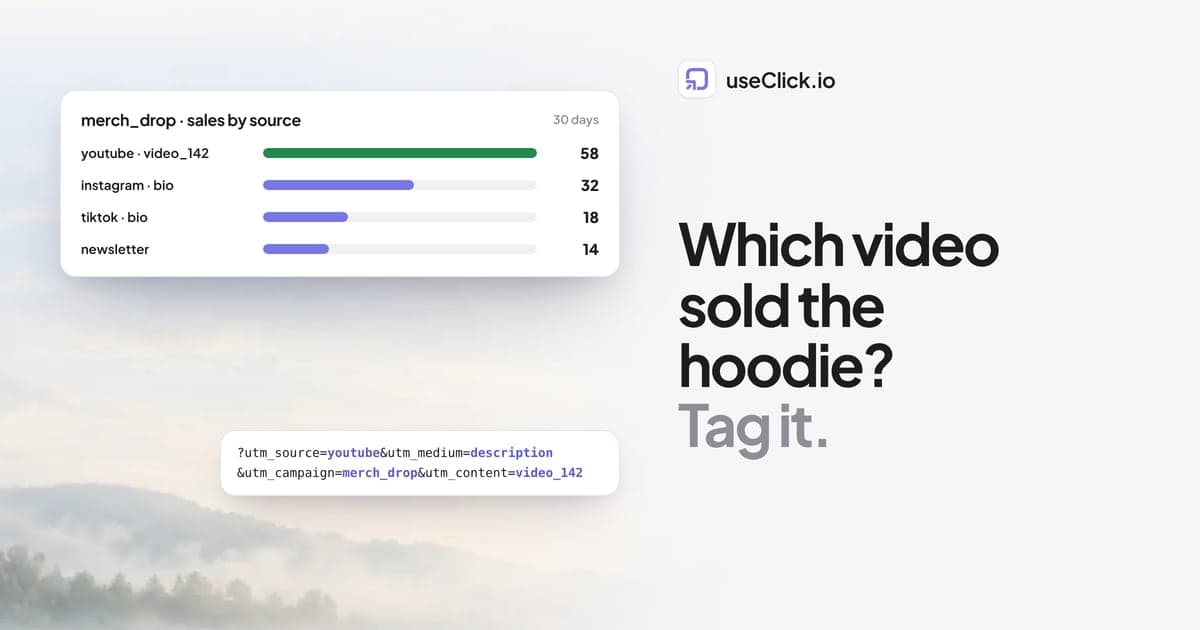
| utm_content (optional) | Which one exactly | video_142, story_day3, short_tutorial |
Write it down once. YouTube, youtube and yt would be three sources in a report.
A full tagged link looks like this:
https://shop.acme.com/hoodie?utm_source=youtube&utm_medium=description&utm_campaign=merch_drop&utm_content=video_142
Nobody wants that in a description. That is what the short link is for.
Short links do the heavy lifting
Wrap every tagged URL in a short link on your own domain: go.acme.com/hoodie-yt. The short link:
- keeps descriptions, bios and pinned comments clean
- counts every tap, including from in-app browsers that never load your shop's analytics properly
- shows countries and devices, which helps when a sponsor asks where your audience is
- can be changed later: when the drop sells out, point the link at the next product and old videos keep working
In useClick, custom domains are on every plan; UTM tags and campaigns are on Starter and above. On Free you can still create one link per platform and compare clicks, which already answers a lot.
If you are new to tags in general, UTM parameters explained covers the basics.
How many links do you need?
Everyday minimum: one per platform. A link for your YouTube descriptions, one for your Instagram bio, one for TikTok, one for the newsletter. Four links, and you already know which platform sends buyers.
For launches: one per piece of content. During a course launch or merch drop, give the three or four main videos and posts their own link (utm_content=video_142). After the launch you know whether the tutorial or the behind-the-scenes video sold more.
For sponsors: one per deal. A separate link per sponsor and platform, with utm_campaign=sponsor_acme. Pair it with the sponsor's code. On a useClick bio page, a promo code block (Starter and above) shows the code with a copy button and counts every copy, which is a number brands understand.
Your bio page is the hub
Most platforms give you one link. Make it a bio page, and make every button on it a tracked link.
- The bio page itself shows views, visitors and taps per button, on every plan.
- Each button can point at a tagged short link, so the shop knows the buyer came from your bio and which button they tapped.
- How a link in bio with analytics shows what is working goes deeper on reading bio numbers.
Link straight to your Stripe or Ko-fi checkout for digital products. useClick takes no share of your sales; the payment goes directly to you.
Reading the result once a month
Pick one day a month and look at three numbers per platform:
| Platform | Clicks (short links) | Sales (shop) | Sales per 100 clicks |
|---|---|---|---|
| YouTube | |||
| TikTok | |||
| Newsletter |
Fill it in from your short link report and your shop's sales by source (Shopify, Gumroad, Stripe and most course platforms read UTM tags). The pattern is usually clear within two months: one platform brings reach, another brings buyers. Both are useful, but you now know which is which.
If your site runs useClick's cookie-free website analytics, you also see what the visitors read before they bought, and on Growth and above, goals connect the sale back to the exact short link.
Common mistakes
- Tagging links to your own pages from your own pages. UTM tags on internal links overwrite the original source. Use them only on links that live on other platforms.
- One link everywhere. Convenient, and it hides the answer. Split by platform at least.
- Changing the scheme every month. The value is in comparing months. Keep the words stable.
- Ignoring the in-app browser. If your shop shows much less traffic than your short link clicks, people are dropping off in the in-app browser. Useful to know when a checkout is slow on mobile.
Frequently asked questions
Do UTM parameters work on Instagram and TikTok?
Yes. Instagram and TikTok pass the full URL, including UTM tags, to the page that opens. Because the link sits in a bio or story, a short link keeps it clean and counts the tap.
What UTM tags should I use for YouTube?
utm_source=youtube, utm_medium=description or pinned_comment, a utm_campaign for what you promote, and optionally utm_content with the video number.
Will UTM tags hurt my links' reach?
No. Platforms do not penalise tagged links. Long, messy URLs can look spammy in a description, which is another reason to use a short link on your own domain.
How do I show a sponsor my results?
Give each sponsor its own link and, on a useClick bio page, a promo code block that counts copies. You can also turn on a public stats page for the sponsor's link and send them the address; they see clicks, countries and devices without logging in.
Do I need a paid plan?
One short link per platform with click counts works on Free. UTM tags, campaigns and promo code blocks are on Starter, which is $12 a month.
Can I see which video sold the most?
Yes, if each important video has its own link with utm_content. Your shop reports sales by that value, and the short link shows the clicks.
The decision in one paragraph
If you sell anything, a product, a course or a sponsor's audience, tag your links with three words and one rule, and wrap them in short links on your own domain. One link per platform tells you where your buyers live; one link per launch video tells you which content sells. Fifteen minutes of setup turns "I think YouTube works" into a number you can show a brand.