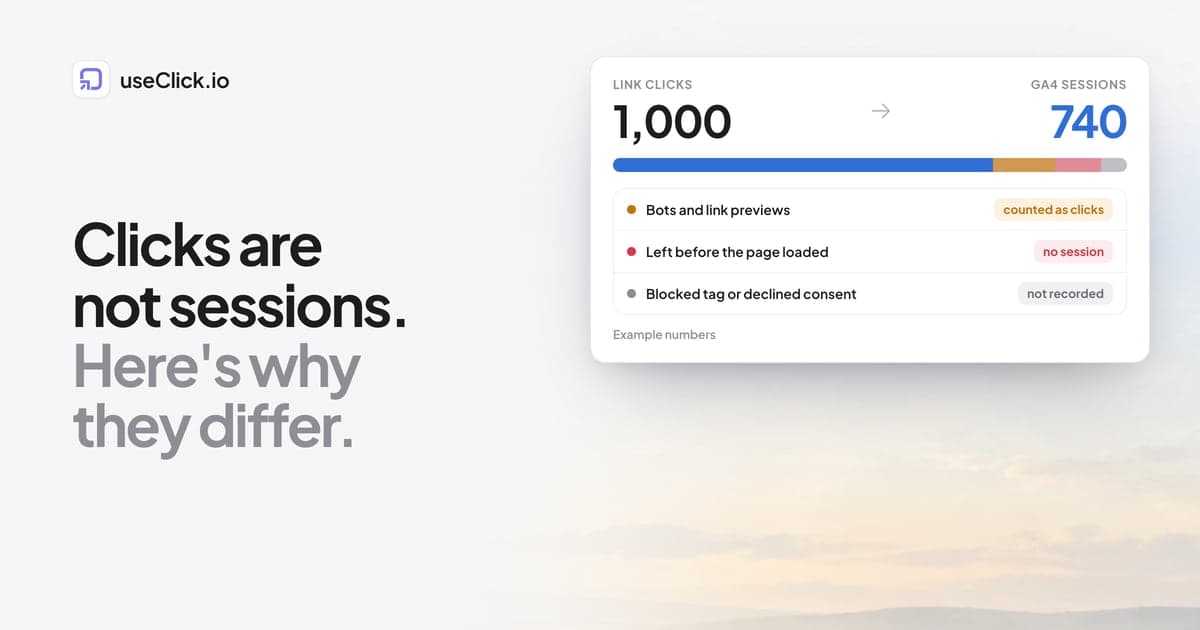
Quick answer: A link click and a GA4 session are different events, so the numbers are not supposed to match. A click is counted when someone requests your short link, before any page loads. A session is counted only if the landing page loads, the analytics tag runs, and the visit is allowed to be recorded. Repeat clicks, people who leave early, bots, link-preview fetchers, redirects that drop parameters, blocked tags and consent settings all push sessions below clicks. Some effects, such as returning visitors, can push them the other way. Compare trends and ratios per campaign, not raw totals.
Key takeaways
- Clicks count requests. Sessions count visits that were able to load and report. A gap in the "sessions are lower" direction is normal.
- Google documents the same effect for ad clicks and lists repeat clicks, early exits, redirects and tracking problems among the causes.
- A stable gap points to structural causes. A gap that suddenly widens points to something that changed: a tag, a redirect or a consent setting.
- Test with your own click before you trust or distrust either number.
- Decide with conversions per click for one campaign over time, not with a single total from one tool.
Clicks and sessions answer different questions
When you share a short link, two systems look at the same visit from different places.
The link tool sits at the start. It sees a request for the short link and records a click at the moment it redirects. It does not need the destination page to load, and it does not need JavaScript to run.
GA4 sits at the end. It sees a visit only after the landing page loads, the GA4 tag executes, and the browser lets the data through. It then groups what it sees into sessions.
So "1,000 clicks and 740 sessions" is not a contradiction. It describes how many requests started and how many visits finished far enough to be measured. The useful question is why the 260 in between did not make it, and whether that number is stable.
What Google says about the gap
Google has a troubleshooting page for the same problem between Google Ads and GA4, titled Clicks and Sessions Discrepancy for Google Ads and Google Analytics. It says some level of discrepancy is expected and lists causes such as:
- A user clicking more than once in a short period, which Analytics may count as a single session.
- Invalid clicks being filtered in the ad platform while the resulting sessions are still reported in Analytics.
- A user leaving before the Analytics tag loads.
- Redirects on the landing page that remove campaign parameters before Analytics records them.
- A landing page that has no tracking at all.
- Browser settings, such as disabled JavaScript or opt-out add-ons.
- Returning users who are attributed to a campaign during its run, which can make sessions exceed clicks.
That page is written for paid ad clicks. It does not describe ordinary short links, so treat it as a close analogy, not as a definition of how your link tool counts. The logic carries over, because the mismatch comes from where each system counts, not from the type of click.
Common causes, and how to tell them apart
| Cause | Pushes sessions | How to check | What to do |
|---|---|---|---|
| Repeat clicks and double taps | Down | Compare unique visitors with total clicks on the link | Compare unique visitors, not raw clicks |
| Visitor leaves before the page loads | Down | Slow landing page, mobile in-app browsers | Speed up the landing page, check the tag loads early |
| Bots and link-preview fetchers | Down | Bot share in the link's analytics | Read the bot share first, then compare |
| Redirect drops UTM parameters | Down for the campaign, up for Direct | Test the link in a redirect checker | Make every redirect pass the full query string |
| Landing page without the GA4 tag | Down | Open the page, check the tag fires | Add the tag to every landing page |
| Consent banner or blockers | Down | Test with and without consent | Accept that some visits are invisible |
| Returning visitors in a campaign | Up | Check new versus returning users | Compare on a like-for-like basis |
| Different time zones or date ranges | Either | Compare the same dates in the same zone | Align both reports first |
Two rows deserve more detail.
Bots and link previews
A click counter records requests, and not every request is a person. Messaging apps and social networks often fetch a link in the background to build a preview. Crawlers follow links too. In useClick, clicks from known bots are included in the click total, and the link's analytics show a bot share and a breakdown by bot, including link-preview fetchers. See link analytics for how the card works. GA4 tags usually do not run for those requests, so they appear as clicks with no session. If the bot share on a link is high, a large part of your gap is explained before you look anywhere else.
Redirects that drop parameters
If the destination URL carries utm_ tags and a redirect on your website, for example from http to https, from www to the bare domain, or a JavaScript redirect, removes the query string, GA4 records the visit without campaign information. The session still exists, but it lands under Direct instead of under your campaign, so the campaign looks smaller than it was. Check it with the free redirect checker, which shows each hop and the final URL.
A diagnosis you can do in 30 minutes
Work through these in order. Stop when the gap is explained.
- Align the reports. Use the same dates and the same time zone in both tools. Many "gaps" are a one-day shift at the edge of the range.
- Pick one link. Do not diagnose a campaign of 30 links at once. Choose one link with enough clicks to be meaningful.
- Check bot share and unique visitors. In the link's analytics, note the share of clicks from known bots and the unique visitors estimate. Unique visitors in useClick is an estimate based on an anonymous hash, so use it as a guide, not as a head count.
- Click the link yourself. Open the short link in a private window, wait for the page to load, and then look for your visit in the real-time report of GA4 and in your link analytics. If you do not appear in GA4, the problem is on the landing page or in consent, not in the link.
- Inspect the redirect chain. Run the short link through a redirect checker and confirm the final URL still has every
utm_parameter. - Check the tag on the landing page. Confirm the GA4 tag exists on that exact page and fires on load, not after a long delay.
- Test consent. Open the page in a fresh browser profile, accept or reject the banner, and see what GA4 records in each case.
If all seven pass and a gap remains, the remainder is the ordinary difference between counting requests and counting finished visits.
What the gap pattern tells you
You do not need a precise percentage to learn from the gap. Watch how it behaves:
| What you see | Likely meaning |
|---|---|
| The gap is similar week after week | Structural: bots, early exits, blockers. Normal. |
| The gap suddenly widens after a website change | A tag, redirect or consent change broke something. Look at what shipped. |
| One campaign has a much bigger gap than the others | A problem with that campaign's landing page or its destination URL. |
| Sessions are higher than clicks | Returning visitors, or visits that came from other sources and were attributed to the campaign. |
| Direct traffic grows while a campaign shrinks | Parameters are being lost somewhere between the click and the page. |
What to compare instead
Raw totals from two tools almost never agree, and arguing about the difference wastes time. These comparisons are more useful:
- Conversions per click, for one campaign, over time. If this ratio is stable, your measurement is consistent, and a change in it is a real signal.
- Sessions per click as a health check. You are not looking for 100%. You are looking for a stable number, and for sudden drops.
- One source of truth per decision. Use the link tool for questions about clicks, channels and links. Use the website analytics for questions about what visitors did on the page.
- Click to conversion in a single system. If you want the click and the visit connected, how to track which short link drove a sale explains how useClick ties a click to a later conversion with a small token, without cookies.
If you do use GA4 for the website side, the website analytics docs show what useClick's own cookie-free tracker records, so you can see both side by side on the same traffic.
Frequently asked questions
Why are my link clicks higher than my GA4 sessions?
Because a click is counted when the link is requested, and a session only when the page loads and the analytics tag runs. Repeat clicks, bots, link previews, early exits, redirects that remove parameters and consent or blocker settings all reduce sessions without reducing clicks.
Is a gap between clicks and sessions a sign that something is broken?
Not by itself. Google's own documentation says some level of discrepancy between clicks and sessions is expected. It becomes a problem when the gap suddenly changes, or when one campaign is far worse than the rest.
Which number should I trust?
Neither is wrong, they measure different things. Use link clicks for questions about links and channels, and sessions or conversions for questions about what happened on your site. Compare ratios over time, not totals between tools.
Can sessions be higher than clicks?
Yes. Returning visitors who arrive again during a campaign can be attributed to it, and visits from other sources can be grouped under a campaign if parameters are set inconsistently.
How do I find out whether bots explain the gap?
Open the link's analytics and look at the bot share. It shows how many clicks came from known bots and crawlers, including link-preview fetchers. If the share is high, a large part of the gap is not people.
Do UTM tags fix the discrepancy?
They fix attribution, not counting. Tags make sure a session is credited to the right campaign. They do not change how many clicks finish as sessions. Consistent tags still matter, and UTM parameters explained covers the basics.
Does a cookie-free analytics tool have the same gap?
Any tool that counts at two different points has some gap. A cookie-free tracker avoids consent banners for its own tag, but visitors who leave before the page loads, bots and redirect problems still apply.
The decision in one paragraph
Do not try to make clicks equal sessions. Align the reports, test with your own click, check the bot share and the redirect chain, and then watch the ratio for each campaign over time. A stable gap is normal. A widening gap is a bug report. Use link analytics for what happened before the page, website analytics for what happened on it, and a single click-to-conversion view when you need both in one place.