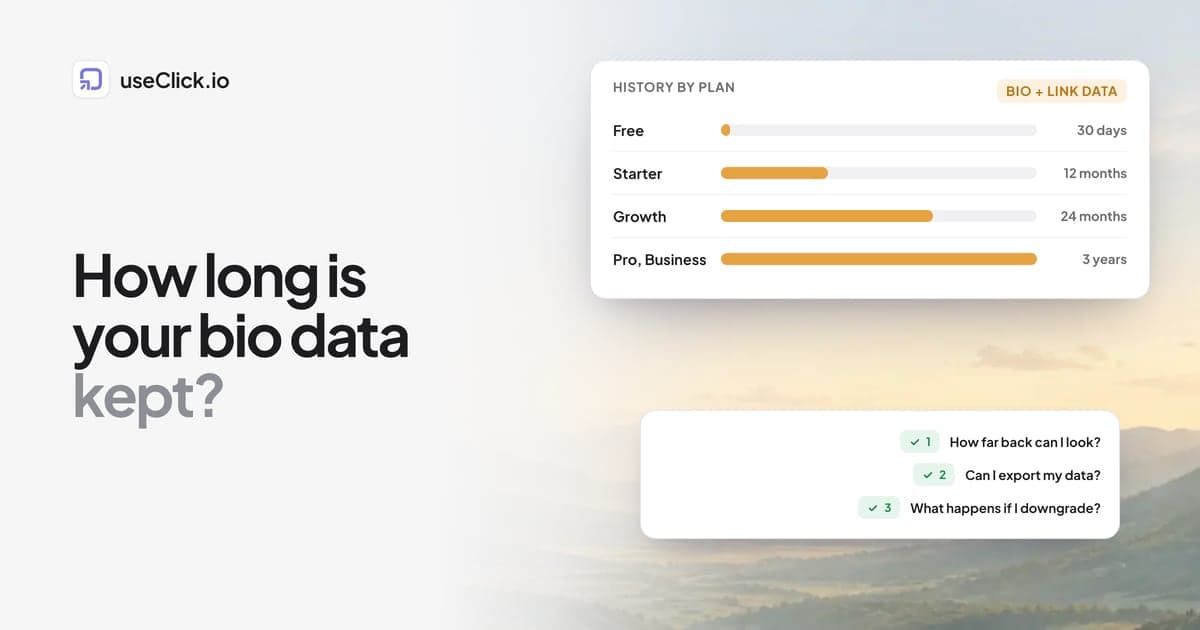
Quick answer: Before you choose a link-in-bio tool, check how far back its analytics go on the plan you would actually use. Some tools show only a recent window, such as the last few weeks, unless you pay for a longer history, and that matters the moment you want to compare this quarter with last year. In useClick, bio page views, visitors and button taps are kept for your plan's retention window: 30 days on Free, 12 months on Starter, 24 months on Growth and 3 years on Pro and Business.
Key takeaways
- Analytics history decides whether you can compare seasons, launches and years. A short window answers "what happened this week?" and nothing more.
- Check the retention per plan on the tool's own pricing or help page. Do not rely on a thread or a review for a number that changes.
- Ask three questions: how far back can I look, can I export my data, and what happens to old data when I downgrade?
- Retention is not the only cost. Look for fees on sales and limits on links and pages too.
Why history matters more than it looks
When you start, the last 7 or 30 days feel like enough. Then something happens:
- A sponsor asks how your bio link performed over the last quarter.
- You want to know whether this December beat last December.
- A video goes viral three weeks late, and you want to see how the tail looked.
- You change the layout of your page and want a fair before and after.
Each of these needs more than a month of data. A tool that keeps only a short window forces you to export numbers regularly or lose them, and a tool that hides older data behind a paid plan turns your own history into something you rent.
What "analytics history" means in a bio tool
Three different things hide behind the same phrase, and tools differ on each:
| What | Question to ask |
|---|---|
| Date range you can pick | Can I choose 90 days, 12 months, "all time"? |
| Data actually stored | Is older data deleted, or only hidden until I upgrade? |
| Export | Can I download my numbers as a CSV, and on which plan? |
The first is what you see in the dashboard. The second decides whether upgrading later brings the old data back. The third is your insurance, because an export is yours whatever the plan does.
How to check a tool in five minutes
- Open the pricing page and look for a row about analytics history, data retention or date ranges. If the page does not say, that is information too.
- Open the help centre and search for "analytics", "history" and "date range". Note the exact words and the date you read them, because plans change.
- Try the dashboard. On the plan you would use, open the date picker. Which ranges are locked?
- Look for an export button and see which plan unlocks it.
- Read what happens on a downgrade. Does data older than the lower plan's window disappear?
Write down the answer for each tool you compare. Do the same for fees on sales and for limits on links, pages and custom domains, because a good analytics window is no help if the plan is priced out of reach for your traffic. The best Linktree alternatives and the useClick vs Linktree comparison lay out those other limits side by side.
What useClick keeps
useClick keeps bio page analytics and link analytics for a window that depends on your plan:
| Plan | Data kept |
|---|---|
| Free | 30 days |
| Starter ($12 a month) | 12 months |
| Growth ($29 a month) | 24 months |
| Pro ($49 a month) | 3 years |
| Business ($199 a month) | 3 years |
A daily job deletes data older than your window, which keeps the product privacy-friendly: nothing is stored longer than the plan says. If you upgrade, the window grows from that point and covers the data you still have. The longest date ranges in the dashboard follow the same windows, and ranges outside your plan show a lock.
Each button on a bio page is a tracked short link, so the numbers you see are the page's views and visitors plus a tap count for every button. The bio page analytics feature and the link analytics docs list what each card shows. Bio analytics are cookie-free and store no IP addresses, so there is nothing personal to keep alive beyond the window.
What to do with a short window
Even with a long window, build the habit of saving a summary, because a number you wrote down never expires:
- Once a month, copy four numbers into a sheet: page views, visitors, total taps, and the top button. Add a column for what you posted that month.
- Export when you can. On Starter and above you can export your clicks as a CSV. Do it before a big change or a downgrade.
- Tag what matters. If you tag button links by platform and post, your history answers "which post sent buyers?" and not only "how many taps?". How to track which bio link made the sale shows the tags, and the free Bio Link UTM Builder creates them for every button, platform and post at once.
When a short window is fine
Not everyone needs years of history. A short window is enough if:
- you only check what happened this week and never compare periods,
- your page is small and changes rarely,
- you export or note your numbers monthly anyway.
If you run launches, sponsor deals or a shop, plan for at least a year, because the interesting questions are about seasons and campaigns, not about the last seven days.
Frequently asked questions
How long does link in bio analytics history last?
It depends on the tool and the plan. Some keep a short recent window on the free plan and more on paid plans. Check the retention row on the tool's own pricing or help page for the plan you would use.
How long does useClick keep bio page analytics?
For the length of your plan's retention window: 30 days on Free, 12 months on Starter, 24 months on Growth, and 3 years on Pro and Business. Older data is deleted automatically.
Can I export my link in bio analytics?
In useClick, exporting clicks as a CSV is available from the Starter plan. Check the export options of any tool before you commit, since an export is the one history you keep whatever happens to your plan.
Does upgrading bring back old data?
It depends on the tool. Some only hide older data on a lower plan, others delete it. In useClick, data older than your window is deleted, so upgrade before you need the history rather than after.
Is a longer history worth paying for?
If you compare campaigns, seasons or years, yes. If you only check what happened this week, a short window plus a monthly note of your numbers can be enough.
Do I need cookies to measure my bio page?
No. useClick counts views, visitors and button taps without cookies and without storing IP addresses.
What else should I check besides history?
Fees on sales, link and page limits, custom domain rules, the badge on your page, and whether you can leave with your data.
The decision in one paragraph
Treat analytics history as part of the price. Open the pricing and help pages of each tool you consider, write down how far back the plan you would use can look, whether you can export, and what happens to old data if you downgrade. Then choose the tool whose answers match the questions you will actually ask: this week's taps, last quarter's launch, or last year's season. And whatever you choose, copy four numbers into a sheet every month.