
Gerenciamento de Links Curtos
Crie links curtos de marca e rastreie cada clique.
Gerenciamento de Links Curtos →Recolha emails verificados das pessoas que clicam nos seus links, antes de chegarem ao destino. O double opt-in integrado mante a sua lista limpa e em conformidade.
Confirm your email to continue
Enter your email and confirm it to open this link.
The owner of this link is responsible for the emails you receive. Nothing is stored until you confirm.
This is the real screen a visitor sees, in place of the destination URL. Only the headline, description, and button text are editable from the link's settings; the fields, the checkbox, and the transparency note underneath stay fixed.
Em vez de ir diretamente ao destino, o visitante ve um breve formulario de consentimento com o seu contacto.
O formulario explica o que esta a subscrever. Apos o envio, e enviado imediatamente um email de confirmacao.
O endereco so e guardado apos o visitante clicar no link de confirmacao. Enderecos nao confirmados nunca sao armazenados.
Apos a confirmacao, o visitante e redirecionado para o URL original.
Email Capture only controls this one confirmation step. Here is exactly what it does and does not do.
Submitting the form only triggers a confirmation email. The address itself isn't written to your Captured Emails list until the visitor clicks the link inside it.
If the visitor never confirms, the link expires after 24 hours. Nothing gets saved, no follow-up email is sent, and they never reach your destination.
Every confirmation email includes an unsubscribe link. Clicking it deletes the address from UseClick's database. If you've already exported it into another tool, removing it there is on you.
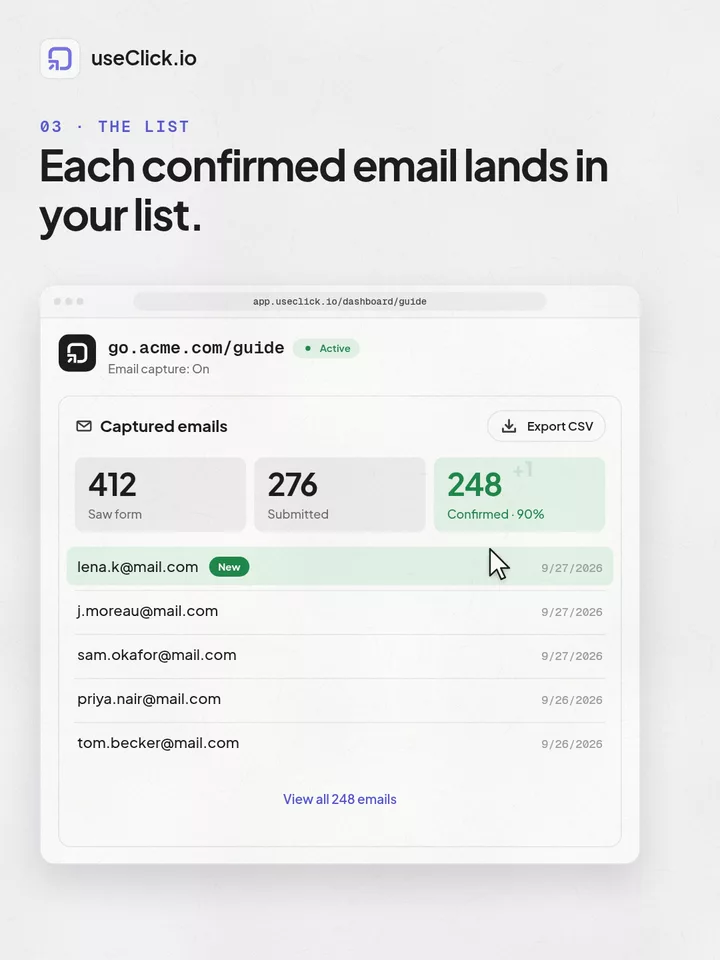
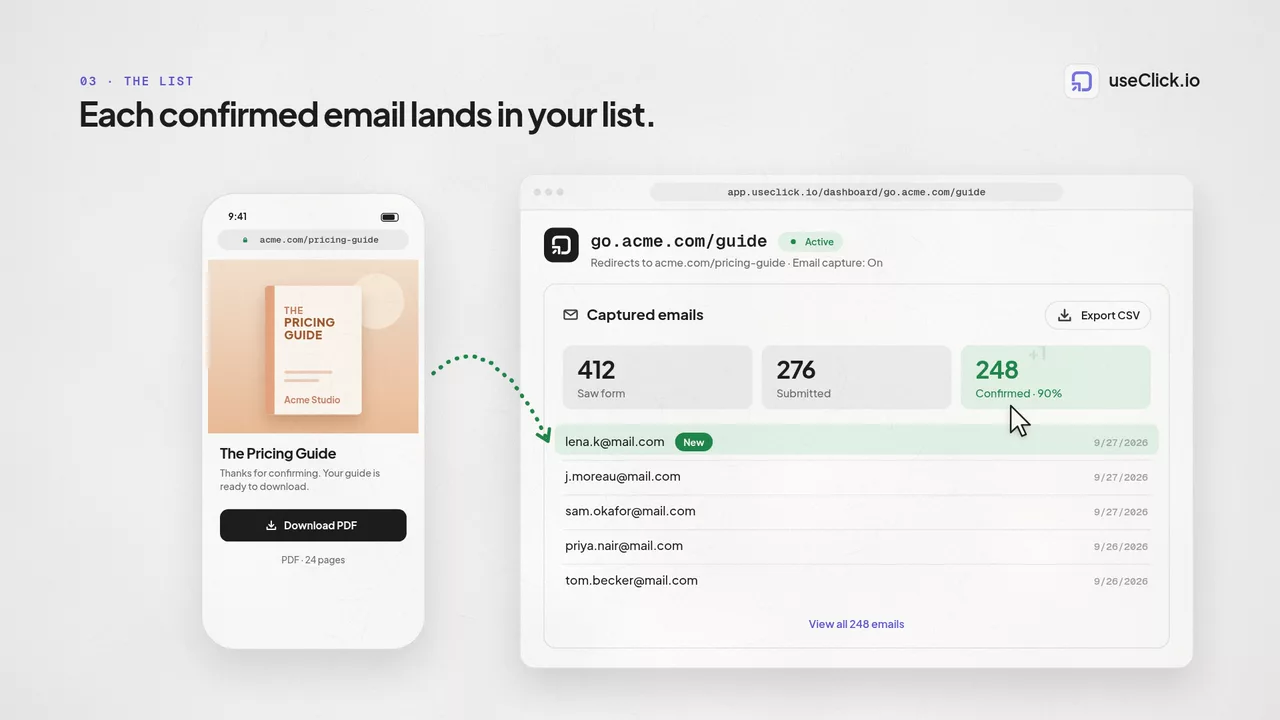
Confirmed addresses show up in a Captured Emails tab on the link's analytics page and export to CSV any time, no waiting on a report.
Turn it on for a single link, not your whole account. Every link it's off for keeps redirecting instantly, as usual.
Point a blog post's “download the checklist” short link through Email Capture so the PDF only unlocks after a confirmed email.
Put an affiliate link behind the form so you keep your own list of everyone who clicked through, not just the ones the merchant reports back.
Post the giveaway link in an Instagram bio or Story. Entrants confirm their email before landing on the entry page, so your list is clean from day one.
Cada endereco na sua lista e real e confirmado antes de ser guardado.
Cada endereco e recolhido com uma confirmacao double opt-in explicita e com registo de data/hora, o padrao que o RGPD espera para a recolha. Isto nao cobre o que enviar depois com a lista exportada.
Os enderecos confirmados aparecem no separador Emails Recolhidos na pagina de analise do link e exportam-se em CSV quando quiser.
Ative num unico link, como um lead magnet ou uma oferta de afiliado, enquanto todos os outros links continuam a redirecionar de imediato.
Nothing is stored yet. Submitting the form only sends a confirmation email. UseClick.io saves the address in your Captured Emails list once the visitor clicks the confirmation link, not before.
The confirmation link expires after 24 hours. If it's never clicked, the address is never saved, the visitor never reaches your destination, and no further emails are sent.
You can edit the headline, description, and button text from the link's settings. The layout, the email field, and the consent checkbox wording are fixed so the flow stays consistent.
It handles the collection step: an explicit, timestamped, double opt-in confirmation, which is what GDPR expects when gathering an address. It has no visibility into whatever emails you send afterward from the exported list using your own tools, so compliance for those sends, including requirements like CAN-SPAM's sender identification and opt-out handling, is on you.
Confirmed addresses appear in a Captured Emails tab on the link's analytics page, exportable as a CSV at any time. The unsubscribe link in the confirmation email removes the address from UseClick.io's database only; if you've already copied it into another tool, removing it there is your responsibility.
Email Capture is a premium, per-link feature available on Starter and above, alongside campaigns, geo-targeting, and password protection.
Um encurtador, uma ferramenta de bio e um script de analytics veem cada um só uma parte da história. O useClick conecta os três, então cada visita vem com onde começou e onde terminou.
Crie links curtos de marca e rastreie cada clique.
Gerenciamento de Links Curtos →Uma página para todos os seus links, com análise por link incluída.
Link no Bio →Tráfego, regiões e páginas principais sem cookies — sem banner de consentimento.
Análise de Site →A captura de emails e uma funcionalidade premium a partir do plano Starter. Ative nas configuracoes de qualquer link, sem formulario separado nem codigo.
