
Gestion de Liens Courts
Créez des liens courts de marque et suivez chaque clic.
Gestion de Liens Courts →Collectez des emails verifies aupres des visiteurs avant qu'ils atteignent la destination. Le double opt-in integre garde votre liste propre et conforme.
Confirm your email to continue
Enter your email and confirm it to open this link.
The owner of this link is responsible for the emails you receive. Nothing is stored until you confirm.
This is the real screen a visitor sees, in place of the destination URL. Only the headline, description, and button text are editable from the link's settings; the fields, the checkbox, and the transparency note underneath stay fixed.
Au lieu d'aller directement a la destination, le visiteur voit un bref formulaire de consentement avec votre adresse de contact.
Le formulaire explique ce pour quoi il s'inscrit. Un email de confirmation est envoye immediatement apres la soumission.
L'adresse n'est enregistree qu'apres que le visiteur clique sur le lien de confirmation. Les adresses non confirmees ne sont jamais stockees.
Apres confirmation, le visiteur est redirige vers l'URL d'origine.
Email Capture only controls this one confirmation step. Here is exactly what it does and does not do.
Submitting the form only triggers a confirmation email. The address itself isn't written to your Captured Emails list until the visitor clicks the link inside it.
If the visitor never confirms, the link expires after 24 hours. Nothing gets saved, no follow-up email is sent, and they never reach your destination.
Every confirmation email includes an unsubscribe link. Clicking it deletes the address from UseClick's database. If you've already exported it into another tool, removing it there is on you.
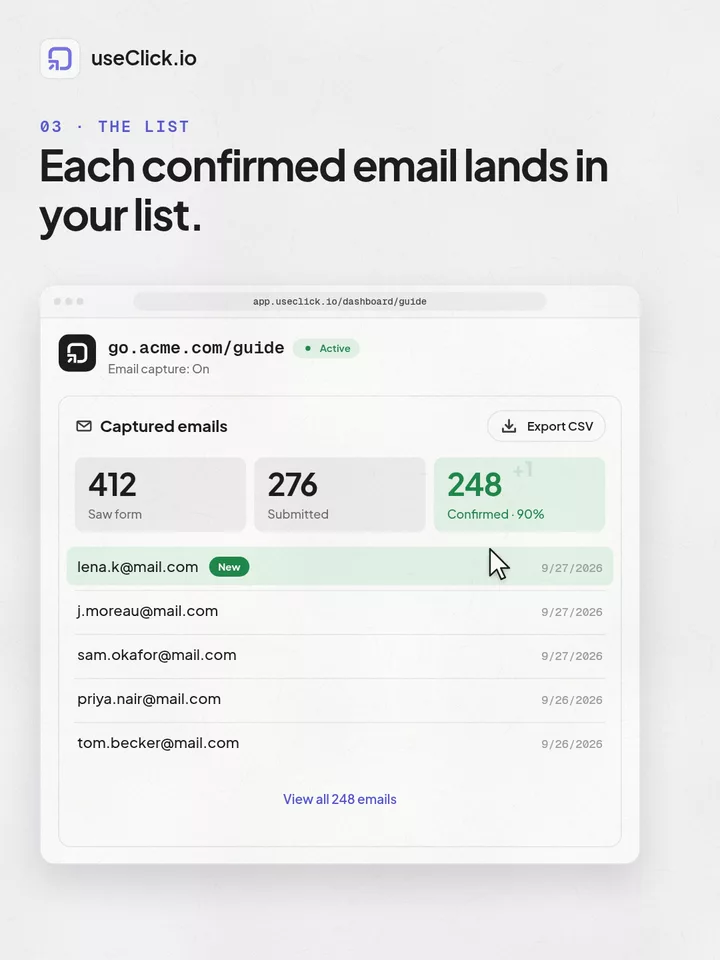
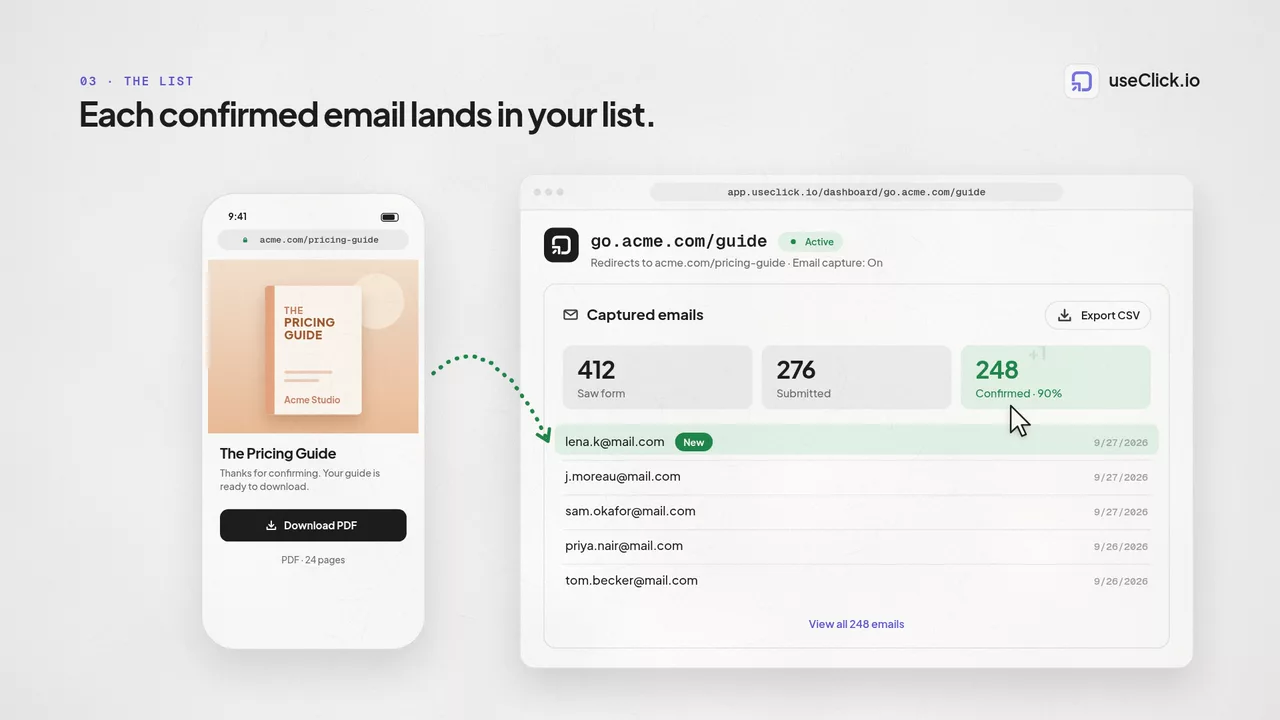
Confirmed addresses show up in a Captured Emails tab on the link's analytics page and export to CSV any time, no waiting on a report.
Turn it on for a single link, not your whole account. Every link it's off for keeps redirecting instantly, as usual.
Point a blog post's “download the checklist” short link through Email Capture so the PDF only unlocks after a confirmed email.
Put an affiliate link behind the form so you keep your own list of everyone who clicked through, not just the ones the merchant reports back.
Post the giveaway link in an Instagram bio or Story. Entrants confirm their email before landing on the entry page, so your list is clean from day one.
Chaque adresse de votre liste est reelle et confirmee avant d'etre enregistree.
Chaque adresse est recueillie avec une confirmation double opt-in explicite et horodatee, le standard attendu par le RGPD pour la collecte. Cela ne couvre pas ce que vous envoyez ensuite avec la liste exportee.
Les adresses confirmees apparaissent dans l'onglet Emails Captures de la page d'analyse du lien et s'exportent en CSV a tout moment.
Activez-le sur un seul lien, comme un lead magnet ou une offre d'affiliation, pendant que tous vos autres liens continuent de rediriger instantanement.
Nothing is stored yet. Submitting the form only sends a confirmation email. UseClick.io saves the address in your Captured Emails list once the visitor clicks the confirmation link, not before.
The confirmation link expires after 24 hours. If it's never clicked, the address is never saved, the visitor never reaches your destination, and no further emails are sent.
You can edit the headline, description, and button text from the link's settings. The layout, the email field, and the consent checkbox wording are fixed so the flow stays consistent.
It handles the collection step: an explicit, timestamped, double opt-in confirmation, which is what GDPR expects when gathering an address. It has no visibility into whatever emails you send afterward from the exported list using your own tools, so compliance for those sends, including requirements like CAN-SPAM's sender identification and opt-out handling, is on you.
Confirmed addresses appear in a Captured Emails tab on the link's analytics page, exportable as a CSV at any time. The unsubscribe link in the confirmation email removes the address from UseClick.io's database only; if you've already copied it into another tool, removing it there is your responsibility.
Email Capture is a premium, per-link feature available on Starter and above, alongside campaigns, geo-targeting, and password protection.
Un raccourcisseur, un outil bio et un script d'analytique ne voient chacun qu'une partie de l'histoire. useClick relie les trois : chaque visite indique où elle a commencé et où elle s'est terminée.
Créez des liens courts de marque et suivez chaque clic.
Gestion de Liens Courts →Une page pour tous vos liens, avec analytique par lien intégrée.
Lien en Bio →Trafic, régions et pages populaires sans cookies — sans bandeau de consentement.
Analytique Web →La capture d'emails est une fonctionnalite premium a partir du plan Starter. Activez-la depuis les parametres de n'importe quel lien, sans formulaire separe ni code.
